SYMPTOM:
Strategy Distribution Services email subscriptions do not open correctly in Microsoft Excel when sent as in CSV file format. All of the data appears in a single column:
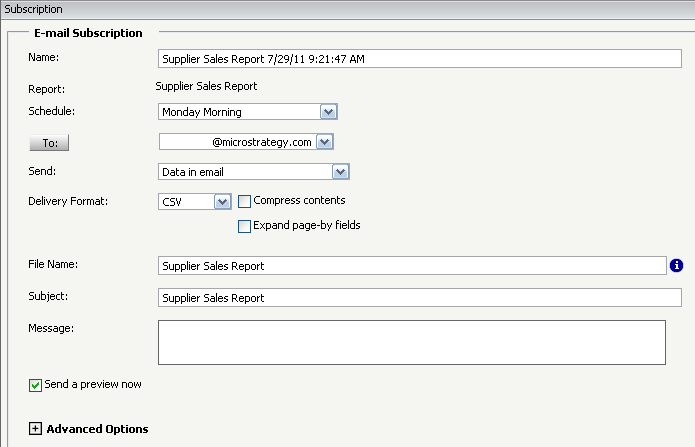

Note: even though the subscription has "Data in email", the report is sent as an attachment. This is because only HTML format is currently supported for "Data in email".
CAUSE:
This issue is caused by the way the encoding is set for the CSV file.
ACTION:
In order to resolve this, change the encoding to UTF-8 by following the steps below:
Windows:
1. Open Registry Editor
2. For 9.x: Navigate to HKEY_LOCAL_MACHINE\SOFTWARE\MicroStrategy\DSS Server\Castor
For 10.x: Navigate to HKEY_LOCAL_MACHINE\SOFTWARE\Wow6432Node\Strategy
\DSS Server\Castor
3. Create a DWORD value "DSNotUseUnicodeForPT" and set the value as 1.
Unix:
1. Open the MSIReg.reg file
2. Locate the key [HKEY_LOCAL_MACHINE\SOFTWARE\MicroStrategy\DSS Server\Castor]
3. Add a new entry with the following: 'DSNotUseUnicodeForPT'=dword:00000001
WORKAROUND:
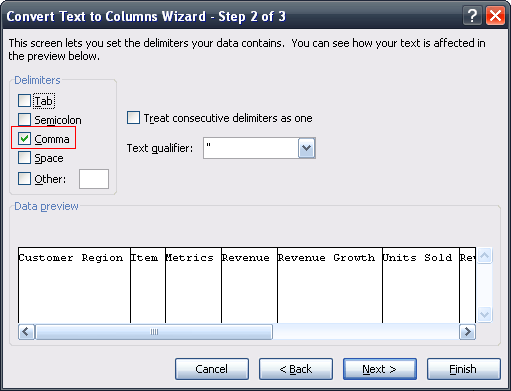
In order to break CSV files with a comma delimiter, the Excel data tool must be used to properly break columns. If Excel is opened, and the Excel file is opened via File > Open, the "convert text to columns" tool will automatically open. If CSV file is opened before Excel, the tool will have to be run from the Data menu.

Select "Delimiter" and comma for the delimiter type:

After using the workaround, the csv file will display properly when opened with Excel.

