EducationSoftwareStrategy.com
StrategyCommunity

Knowledge Base

Product

Community

Knowledge Base

TopicsBrowse ArticlesDeveloper Zone

Product

Download SoftwareProduct DocumentationSecurity Hub

Education

Tutorial VideosSolution GalleryEducation courses

Community

GuidelinesGrandmastersEvents
x_social-icon_white.svglinkedin_social-icon_white.svg
Strategy logoCommunity

© Strategy Inc. All Rights Reserved.

LegalTerms of UsePrivacy Policy
  1. Home
  2. Topics

KB37361: MicroStrategy 9.x and 10.x installation hangs at "Installing Microsoft Web Services Enhancements (WSE) 3.0"


Community Admin

• Strategy


This KB describes a different issue from the one outlined in the KB below: KB32369: MicroStrategy 9.x and 10.x installation hangs at 'Installing Microsoft Web Services Enhancements (WSE) 3.0' 

SYMPTOM:
When installing Strategy 9.x or 10.x, the installation hangs at "Installing Microsoft Web Services Enhancements (WSE) 3.0".
This Knowledge Base article describes a different issue from the one outlined in the KB below:
KB32369: Strategy 9.x and 10.x installation hangs at 'Installing Microsoft Web Services Enhancements (WSE) 3.0' 
In this case the Strategy installer shows the same message during the “hang”:


Installing Microsoft Web Services Enhancements (WSE) 3.0
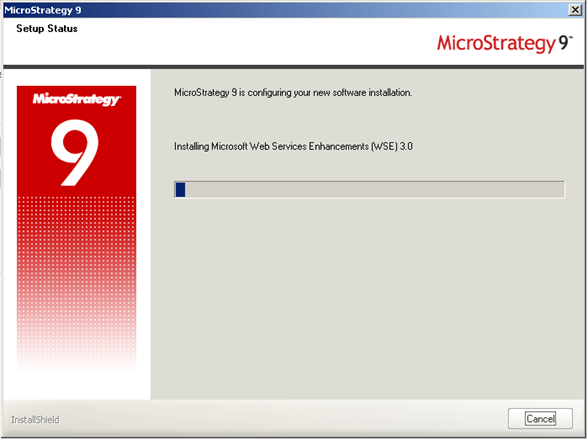
ka04W000001MKriQAG_0EM440000002HQo.png

 
However, logged in the installation log file (install.log) could be found the last step that was executed by the installer:


DHTML Editing Control
Trying to launch the DHTML Editing Control install

CAUSE:
DHTML Editing Control is launching its own installation routine during Strategy installation and sometimes it can face some issues on Windows 2008 R2 (or other UAC-enabled Operating Systems).
 
WORKAROUND:
Users can kill the DHTML Editing Control installation process (msiexec.exe *32) using the Windows Task Manager. At the end of the installation, users should manually install the DHTML Editing Control directly from the Strategy “3rd Party” installation folder. The actual file is generally located at <Installation Drive>:\Installations\Utilities\3rdParty\Triedit\DhtmlEd.msi
 
Third Party Software Installation WARNING:
The third-party product(s) discussed in this technical note is manufactured by vendors independent of Strategy. Strategy makes no warranty, express, implied or otherwise, regarding this product, including its performance or reliability.


Comment

0 comments

Details

Knowledge Article

Published:

April 4, 2017

Last Updated:

April 4, 2017