SYMPTOM:
Strategy Office 9.x cannot connect to Web Services deployed on WebSphere 7.0.0.9 on AIX 6.1. The following error comes back in the browser when the connection to Web Services is tested:
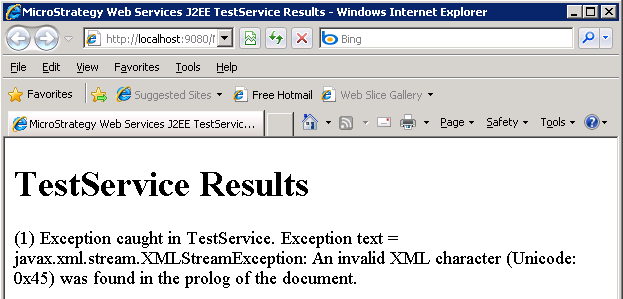
TestService Results
(1) Exception caught in TestService. Exception text = javax.xml.stream.XMLStreamException: An invalid XML character (Unicode: 0x45) was found in the prolog of the document.
The following error can be found in WebSphere's SystemOut.log file.
00000024 servlet E com.ibm.ws.webcontainer.servlet.ServletWrapper init SRVE0100E: Uncaught init() exception created by servlet MSTRWSJServlet in application WebServices: java.lang.NoClassDefFoundError: org.apache.woden.resolver.URIResolver
at java.lang.J9VMInternals.verifyImpl(Native Method)
at java.lang.J9VMInternals.verify(J9VMInternals.java:72)
at java.lang.J9VMInternals.initialize(J9VMInternals.java:134)
at org.apache.axis2.deployment.WarBasedAxisConfigurator.loadServicesFromWebInf(WarBasedAxisConfigurator.java:316)
at org.apache.axis2.deployment.WarBasedAxisConfigurator.loadServices(WarBasedAxisConfigurator.java:281)
at org.apache.axis2.context.ConfigurationContextFactory.createConfigurationContext(ConfigurationContextFactory.java:82)
at org.apache.axis2.transport.http.AxisServlet.initConfigContext(AxisServlet.java:519)
at org.apache.axis2.transport.http.AxisServlet.init(AxisServlet.java:437)
at com.ibm.ws.webcontainer.servlet.ServletWrapper.init(ServletWrapper.java:358)
at com.ibm.ws.webcontainer.servlet.ServletWrapperImpl.init(ServletWrapperImpl.java:168)
at com.ibm.ws.webcontainer.servlet.ServletWrapper.handleRequest(ServletWrapper.java:737)
at com.ibm.ws.webcontainer.servlet.ServletWrapper.handleRequest(ServletWrapper.java:500)
at com.ibm.ws.webcontainer.servlet.ServletWrapperImpl.handleRequest(ServletWrapperImpl.java:178)
at com.ibm.ws.webcontainer.webapp.WebApp.handleRequest(WebApp.java:3810)
at com.ibm.ws.webcontainer.webapp.WebGroup.handleRequest(WebGroup.java:276)
at com.ibm.ws.webcontainer.WebContainer.handleRequest(WebContainer.java:931)
at com.ibm.ws.webcontainer.WSWebContainer.handleRequest(WSWebContainer.java:1583)
at com.ibm.ws.webcontainer.channel.WCChannelLink.ready(WCChannelLink.java:183)
at com.ibm.ws.http.channel.inbound.impl.HttpInboundLink.handleDiscrimination(HttpInboundLink.java:455)
at com.ibm.ws.http.channel.inbound.impl.HttpInboundLink.handleNewInformation(HttpInboundLink.java:384)
at com.ibm.ws.http.channel.inbound.impl.HttpInboundLink.ready(HttpInboundLink.java:272)
at com.ibm.ws.tcp.channel.impl.NewConnectionInitialReadCallback.sendToDiscriminators(NewConnectionInitialReadCallback.java:214)
at com.ibm.ws.tcp.channel.impl.NewConnectionInitialReadCallback.complete(NewConnectionInitialReadCallback.java:113)
at com.ibm.ws.tcp.channel.impl.AioReadCompletionListener.futureCompleted(AioReadCompletionListener.java:165)
at com.ibm.io.async.AbstractAsyncFuture.invokeCallback(AbstractAsyncFuture.java:217)
at com.ibm.io.async.AsyncChannelFuture.fireCompletionActions(AsyncChannelFuture.java:161)
at com.ibm.io.async.AsyncFuture.completed(AsyncFuture.java:138)
at com.ibm.io.async.ResultHandler.complete(ResultHandler.java:204)
at com.ibm.io.async.ResultHandler.runEventProcessingLoop(ResultHandler.java:775)
at com.ibm.io.async.ResultHandler$2.run(ResultHandler.java:905)
at com.ibm.ws.util.ThreadPool$Worker.run(ThreadPool.java:1550)
Caused by: java.lang.ClassNotFoundException: org.apache.woden.resolver.URIResolver
at org.eclipse.osgi.framework.internal.core.BundleLoader.findClass(BundleLoader.java:402)
at org.eclipse.osgi.framework.internal.core.BundleLoader.findClass(BundleLoader.java:347)
at org.eclipse.osgi.internal.baseadaptor.DefaultClassLoader.loadClass(DefaultClassLoader.java:83)
at java.lang.ClassLoader.loadClass(ClassLoader.java:618)
... 31 more
CAUSE:
The setting for "class loading" is not properly configured in the IBM WebSphere enterprise applications.
ACTION:
See Installation and Configurationg Guide --> 7. Deploying Strategy Web Services --> Deploying with WebSphere and IBM HTTP Server --> Preparing for the application installation instructions.
To configure class loading, following steps should be performed in the WebSphere Integrated Solutions Console:
1. Expand Applications, Application Types, and then WebSphere Enterprise Applications to display a list of installed applications;
2. In the list of Enterprise Applications, click on the application name just installed, for example, StrategyWS_war;
3. In the Detail Properties list, click on Class loading and update detection;
4. For the Class loader order, select Classes loaded with local class loader first (parent last); click Apply; click Ok;
5. The page on the right pane returns to its previous main configuration tab;
6. Under Modules section, click on Manage Modules;
7. Under the Module header, click on the Strategy Web Services J2EE hyperlink;
8. In the Class loader order drop-down list, select Classes loaded with local class loader first (parent last); click Apply; click Ok;
9. In the Messages box at the top of the page, click Save.
RELATED TECHNICAL NOTES:
