EducationSoftwareStrategy.com
StrategyCommunity

Knowledge Base

Product

Community

Knowledge Base

TopicsBrowse ArticlesDeveloper Zone

Product

Download SoftwareProduct DocumentationSecurity Hub

Education

Tutorial VideosSolution GalleryEducation courses

Community

GuidelinesGrandmastersEvents
x_social-icon_white.svglinkedin_social-icon_white.svg
Strategy logoCommunity

© Strategy Inc. All Rights Reserved.

LegalTerms of UsePrivacy Policy
  1. Home
  2. Topics

KB37380: Transaction Services Document data is not updated after making changes in MicroStrategy Web 9.2.1 and later


Community Admin

• Strategy


Transaction Services Document data is not updated after making changes in MicroStrategy Web 9.2.1 and later

SYMPTOM:
The Transaction Services Document is configured to refresh the current document in Strategy Web 9.2.1, after insert, update, delete operations, but the data is not updated. For example, a user configures the Transaction Services Document to refresh the current document as shown below:
 

ka04W000000OagWQAS_0EM4400000027Xy.jpeg

 
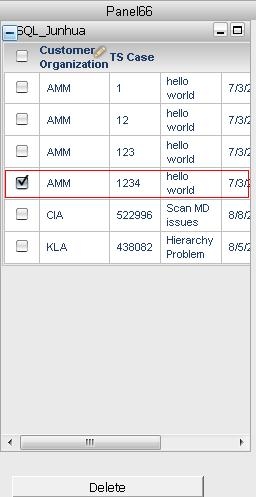
Then deletes following row in the Transaction Services Document:
ka04W000000OagWQAS_0EM4400000027Xg.jpeg

 
But this row data is still shown after deletion.
 
The delete operation is successful since that row data is gone in the database:

ka04W000000OagWQAS_0EM4400000027Xi.jpeg

 
 Note: This issue also occurs for Update statements. After submitting an update. the database reflects the new data but the document still displays the old data.
 
CAUSE:
The cause for this is that the underlying dataset report is cached. When the Transaction Services Document is re-executed, it is hitting the Freeform SQL report cache, thus the old data is displayed.
 
ACTION:
Disable the underlying dataset report cache.
KB37380


Comment

0 comments

Details

Knowledge Article

Published:

May 12, 2017

Last Updated:

December 28, 2018