EducationSoftwareStrategy.com
StrategyCommunity

Knowledge Base

Product

Community

Knowledge Base

TopicsBrowse ArticlesDeveloper Zone

Product

Download SoftwareProduct DocumentationSecurity Hub

Education

Tutorial VideosSolution GalleryEducation courses

Community

GuidelinesGrandmastersEvents
x_social-icon_white.svglinkedin_social-icon_white.svg
Strategy logoCommunity

© Strategy Inc. All Rights Reserved.

LegalTerms of UsePrivacy Policy
  1. Home
  2. Topics

KB37382: What are different Action Types of Action Selector Buttons or Links in MicroStrategy Web 9.x and 10.x


Community Admin

• Strategy


This article details the Action Types for Action Selector Buttons and Links: Submit, Recalculate, and Discard Changes.

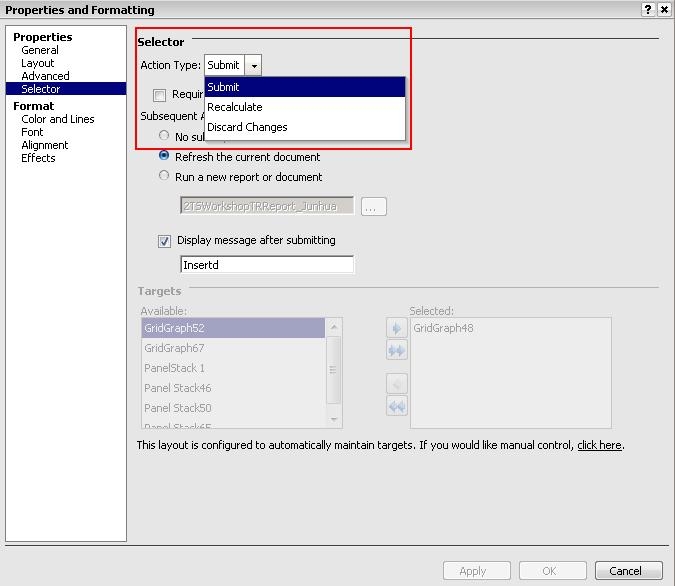
The Action Type option determines the type of action to perform when a user clicks the selector. This option is only available for Action Selector Buttons or Links. There are three different Action Types of Action Selector Buttons or Links in Strategy Web 9.x and 10.x, as shown below: 
ka04W000000OagbQAC_0EM4400000027Xq.jpeg
  • Submit: Select this option to allow the user to submit their changes and update the data in their data source.
  • Recalculate: Select this option to recalculate the values of derived metrics, subtotals, reapply number and date formatting, and update other values calculated by the Analytical Engine when the user clicks the selector. No data is submitted to the Transaction Services report.
  • Discard Changes: Select this option to allow the user to discard their changes. The user's changes to values displayed in the target Grid/Graph or panel stack of the selector are reverted to their values from the last time the changes were submitted.


KB37382


Comment

0 comments

Details

Knowledge Article

Published:

May 23, 2017

Last Updated:

December 28, 2018