EducationSoftwareStrategy.com
StrategyCommunity

Knowledge Base

Product

Community

Knowledge Base

TopicsBrowse ArticlesDeveloper Zone

Product

Download SoftwareProduct DocumentationSecurity Hub

Education

Tutorial VideosSolution GalleryEducation courses

Community

GuidelinesGrandmastersEvents
x_social-icon_white.svglinkedin_social-icon_white.svg
Strategy logoCommunity

© Strategy Inc. All Rights Reserved.

LegalTerms of UsePrivacy Policy
  1. Home
  2. Topics

KB37385: "Cannot determine a unique Schema object for the object [Database Instance name] of type DB Instance." error message appears when creating a report from MDX Sources in MicroStrategy Developer


Stefan Zepeda

Salesforce Solutions Architect • Strategy


SYMPTOM:
When the user creates a report from an MDX source, the following error occurs in Strategy Developer:
 

ka02R000000kcLKQAY_0EM440000002Dbg.jpeg


Cannot determine a unique Schema object for the object of type DB Instance 
 
 
CAUSE:
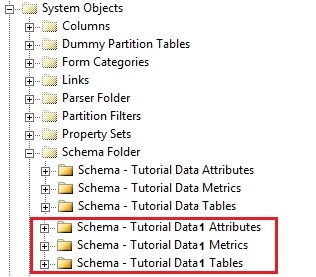
The system has detected that a database instance is being referred to by one or more Schema objects.  This "Schema" object is a special, internal object used in MDX generation and generally, per project, there is a one to one mapping between database instance and Schema object.  It it currently unknown what actions lead to this incorrect object construct. One possible cause is that the MDX report creation process was interrupted by a network timeout or application crash. This issue can be observed by enabling hidden and invisible folders in Desktop, see technical note below for more details:
 
KB19828 - How to display hidden and invisible folders/objects in Strategy Desktop 8.1. - 9.x?
 
If the user navigates to System Objects > Schema Folder, there should be one additional set of schema folders with "1" as suffix:
 

ka02R000000kcLKQAY_0EM440000002DbR.jpeg

 
ACTION:
Please contact Strategy Technical Support for further assistance. In order to track down the cause of the inconsistency, customers encountering this issue should make note of Schema-related changes, Object Migrations, or error messages prior to experiencing the problem. Change Journaling, if it has been enabled, can help in preserving this information.  Any application crashes or use of database instances for MDX/Freeform SQL/Query Builder in the days or hours prior to this issue occuring should also be noted in an attempt to find the root cause.


Comment

0 comments

Details

Knowledge Article

Published:

May 9, 2017

Last Updated:

May 9, 2017