EducationSoftwareStrategy.com
StrategyCommunity

Knowledge Base

Product

Community

Knowledge Base

TopicsBrowse ArticlesDeveloper Zone

Product

Download SoftwareProduct DocumentationSecurity Hub

Education

Tutorial VideosSolution GalleryEducation courses

Community

GuidelinesGrandmastersEvents
x_social-icon_white.svglinkedin_social-icon_white.svg
Strategy logoCommunity

© Strategy Inc. All Rights Reserved.

LegalTerms of UsePrivacy Policy
  1. Home
  2. Topics

KB37402: Extra "Metrics" column issue with pivoted reports. Even when "Remove extra column" is checked, the word, "Metrics" persists with MicroStrategy Web 10.x


Community Admin

• Strategy


This article describes a behaviour where when "Remove extra column" option is set to "Yes," exported results in Excel for some reports still have a word, "Metric" in the grid in MicroStrategy Web 10.x

SYMPTOM:
Even when "Remove extra column" option is set to "Yes," exported results in Excel for some reports still have a word, "Metric" in the grid in Strategy Web 10.x.
 
STEPS TO REPRODUCE:
Execute the following in Strategy Tutorial:

  • Create a report with Quarter attribute in the row, Year and Category attributes and Cost metric in the column of the grid. (Place Cost at the bottom among 3 objects in the column.)
     
ka04W000000Obo7QAC_0EM4400000027W2.png
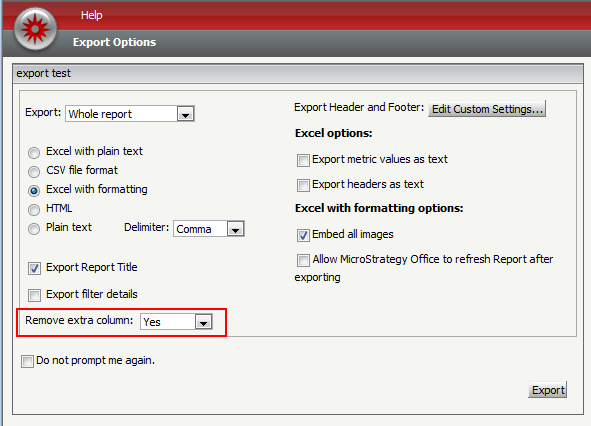
  • Execute the report and export to Excel with the option, "Remove extra column" to "Yes"
     
ka04W000000Obo7QAC_0EM4400000027WK.png
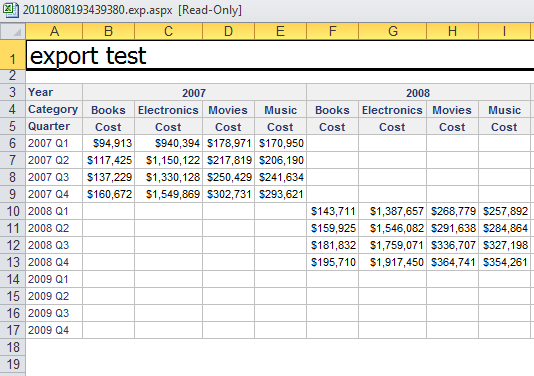
  • Notice that the extra column has been removed and there is no word, "Metric," in the exported result.
     
ka04W000000Obo7QAC_0EM4400000027W4.png
  • Go back to the report and pivot Cost metric to be in between Year and Category attribute.
     
ka04W000000Obo7QAC_0EM4400000027WI.png
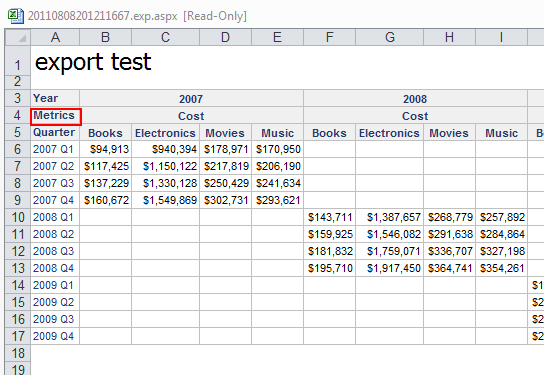
  • Export to Excel again with "Remove extra column" option to "Yes." Notice that the word "Metric" appears next to the columns for Cost metric while extra blank column has been removed. 
     
ka04W000000Obo7QAC_0EM4400000027WH.png

CAUSE:
This is working by design. Because the option for "Remove extra column" is removing the column, when the metric is not the one placed at the bottom, the column that would hold the header of the attribute (in this example, Category) is also removed. 
 
ACTION:
Place the metric below all attributes in the column to make sure that selecting "Remove extra column" makes sense for the grid design.


Comment

0 comments

Details

Knowledge Article

Published:

May 31, 2017

Last Updated:

May 31, 2017