EducationSoftwareStrategy.com
StrategyCommunity

Knowledge Base

Product

Community

Knowledge Base

TopicsBrowse ArticlesDeveloper Zone

Product

Download SoftwareProduct DocumentationSecurity Hub

Education

Tutorial VideosSolution GalleryEducation courses

Community

GuidelinesGrandmastersEvents
x_social-icon_white.svglinkedin_social-icon_white.svg
Strategy logoCommunity

© Strategy Inc. All Rights Reserved.

LegalTerms of UsePrivacy Policy
  1. Home
  2. Topics

KB37413: Subtotal for ending lookup metric works only based on the existing data regardless of difference between the ending lookup and ending fact in grouping setting in MicroStrategy Analytical Engine


Community Admin

• Strategy


SYMPTOM:
 
Subtotal for ending lookup metric works only based on the existing data regardless of difference between the ending lookup and ending fact in grouping setting in Strategy Analytical Engine
 
STEPS TO REPRODUCE:
 
Follow the steps below using Strategy Tutorial project to reproduce the issue:
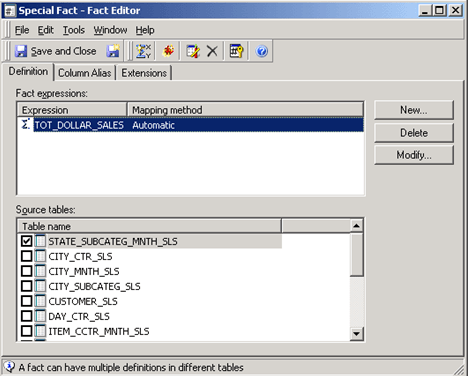


  • Create a new fact "Special Fact" as follows:
ka04W000000OcAdQAK_0EM440000002Dbl.png
  • Creat a metric "End on hand Lookup" using "Special Fact", set metric level to Month with Filtering: standard and Grouping: ending(lookup), as shown below:  
ka04W000000OcAdQAK_0EM440000002Dbh.png
  •  
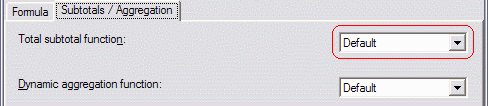
    Set "Total subtotal function" to Default, as shown below:
ka04W000000OcAdQAK_0EM440000002Dbe.gif
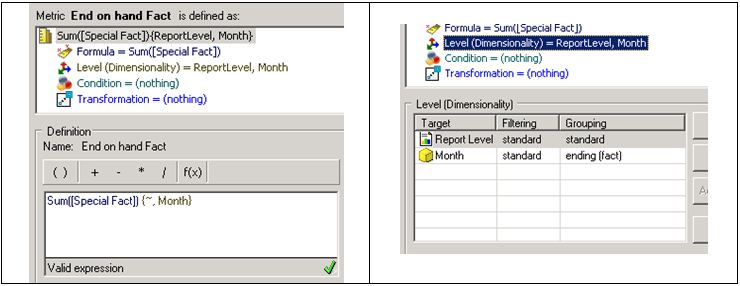
  • Creat a metric "End on hand Fact" using "Special Fact", set metric level to Month with Filtering: standard and Grouping: ending(fact), as shown below:
ka04W000000OcAdQAK_0EM440000002DbS.png
  •  
    Set "Total subtotal function" to Default, as shown below:
     
ka04W000000OcAdQAK_0EM440000002Dbe.gif
  • Create a report with attributes "Year", "Month", "Subcategory" and metrics "End on hand Lookup", "End on hand Fact", "Profit Target", as shown below:
ka04W000000OcAdQAK_0EM440000002Dbd.png
  •  
    Set filters to Year in list (2008) and Subcategory in list below:
ka04W000000OcAdQAK_0EM440000002Dbc.png
  •  
    Set all metric join type to "Outer", as shown below:
     
ka04W000000OcAdQAK_0EM440000002DbV.png
  •  
     
    Set the VLDB property "Join Type" to "Join 92", as shown below:
     
ka04W000000OcAdQAK_0EM440000002Dbi.png
  • Use Strategy DB QueryTool to run the following SQL against the tutorial data repository:


    Sample Code/Error
    delete FROM STATE_SUBCATEG_MNTH_SLS
      where MONTH_ID = 200812
      and SUBCAT_ID in (11, 12, 13, 14, 15, 16, 21)

     
    This is to produce the differences between end-of-fact and end-of-lookup dimensionality. By default the inventory table has data for every combination of product and month.
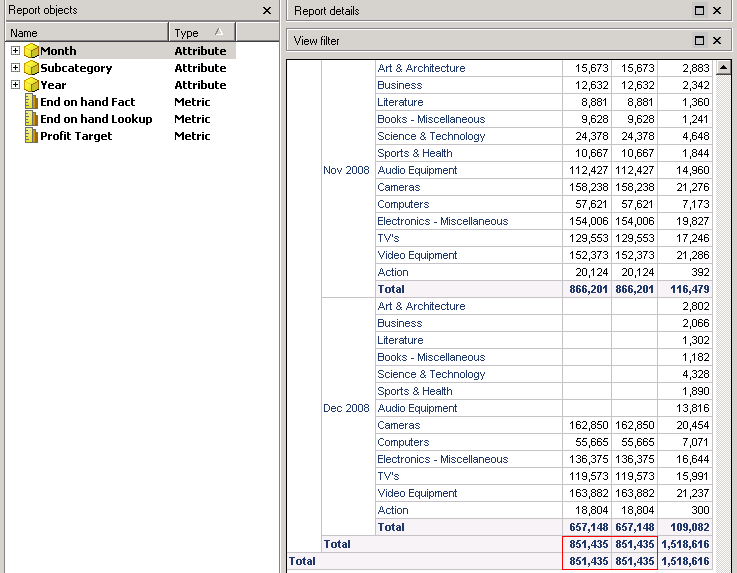
  • Run the report, note that the subtotals for "End on hand Fact" and "End on hand Lookup" are the same:
ka04W000000OcAdQAK_0EM440000002Dbj.png

CAUSE:
 
This is a known limitation in the Strategy Analytical Engine. The subtotals for "End on hand fact" are correct as for every subcategory, engine will evaluate the fact for the last period found.

ka04W000000OcAdQAK_0EM440000002Dbk.png

 
Theoretically, for "End on hand Lookup", engine should only calculate the values in Dec 2008 instead use the last non-null data.
 
However, in Strategy, subtotals are calculated by Analytical Engine after the result is returned from warehouse. The key issue is that, Analytical Engine perform aggregation only based on the EXISTING data. In other words, when Analytical Engine is involved, there is actually no difference between ending lookup and ending fact (consider it as ending MSIfile table). Analytical Engine is not able to query database to get the difference.
 
ACTION:
Convert the null values for "End on hand Lookup" to zero. Change the definition of the "End on hand Lookup" metric to be "Sum(NullToZero(Sum() {~+} )) {~+, >Month+}", as shown below:

ka04W000000OcAdQAK_0EM440000002DbT.png

After this modification, run the report again, the data is returned correctly, as shown below:

ka04W000000OcAdQAK_0EM440000002Dbm.png


Metadata Modification:
WARNING:
Manually editing values in the Strategy Metadata incorrectly may cause serious, project-wide problems that may make your project unusable. Since these are user-initiated changes, they are not covered by any Strategy warranty. Users are strongly encouraged to backup Metadata prior to any alteration.


Comment

0 comments

Details

Knowledge Article

Published:

May 22, 2017

Last Updated:

May 22, 2017