EducationSoftwareStrategy.com
StrategyCommunity

Knowledge Base

Product

Community

Knowledge Base

TopicsBrowse ArticlesDeveloper Zone

Product

Download SoftwareProduct DocumentationSecurity Hub

Education

Tutorial VideosSolution GalleryEducation courses

Community

GuidelinesGrandmastersEvents
x_social-icon_white.svglinkedin_social-icon_white.svg
Strategy logoCommunity

© Strategy Inc. All Rights Reserved.

LegalTerms of UsePrivacy Policy
  1. Home
  2. Topics

KB37446: How to get the list of all disabled users in MicroStrategy 10.x metadata?


Community Admin

• Strategy


How to get the list of all disabled users in MicroStrategy 10.x metadata?

How to get the list of all disabled users in Strategy 10.x metadata?
 
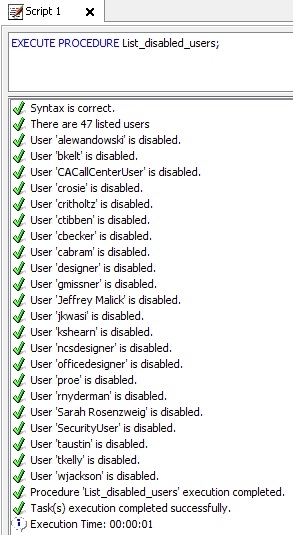
It is possible to get the list of all disabled users Strategy 10.x metadata using a Command Manager outline. Inside command manager, navigate to Outlines -> Procedure_Outlines -> Sample_Procedures -> List_Disabled_Users. Once you run this procedure, it will give the list of all users that are currently disabled in the metadata as shown below:
 

ka04W000000ObbhQAC_0EM440000002AaJ.jpeg

 
Note that the main purpose of the Sample Procedures in Command Manager is to showcase how additional functionality could be added by the end user.


Comment

0 comments

Details

Knowledge Article

Published:

May 29, 2017

Last Updated:

May 29, 2017