EducationSoftwareStrategy.com
StrategyCommunity

Knowledge Base

Product

Community

Knowledge Base

TopicsBrowse ArticlesDeveloper Zone

Product

Download SoftwareProduct DocumentationSecurity Hub

Education

Tutorial VideosSolution GalleryEducation courses

Community

GuidelinesGrandmastersEvents
x_social-icon_white.svglinkedin_social-icon_white.svg
Strategy logoCommunity

© Strategy Inc. All Rights Reserved.

LegalTerms of UsePrivacy Policy
  1. Home
  2. Topics

KB37450: How to create a filter to limit the rolling date range between the first day of month and the prompted day in MicroStrategy 9.x?


Stefan Zepeda

Salesforce Solutions Architect • Strategy


Follow steps described in this KB Article to create a filter to limit the rolling date range between the first day of month and the prompted day

Follow steps below to create a filter and limit the rolling date range between the first day of month and the prompted day:
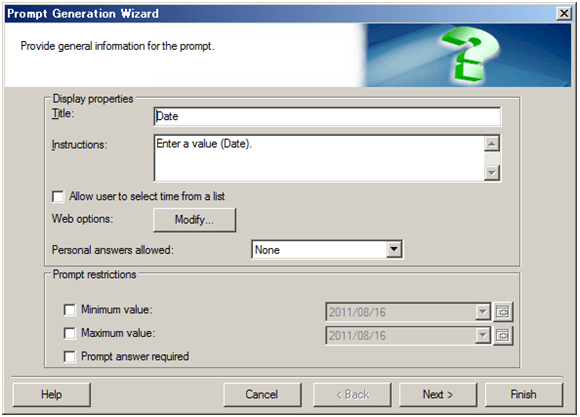


  • In Strategy Desktop, create a Value prompt and save it as Value(Date), as shown below:
     
ka02R000000kXZ0QAM_0EM440000002DbA.png
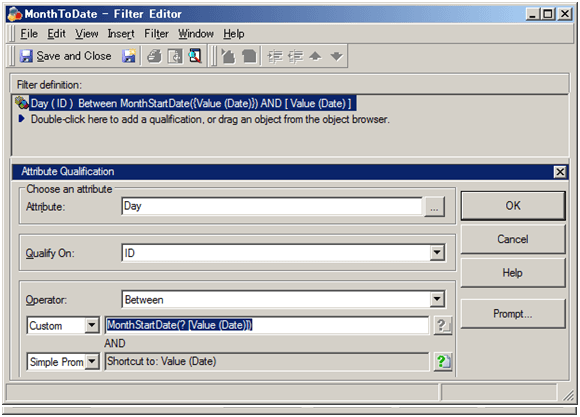
  • Create an attribute qualification filter based on Value(Date) prompt created at step 1, as shown below:
     
     
ka02R000000kXZ0QAM_0EM440000002DbD.png
  •  
    Day ID Between
    Custom:
    MonthStartDate(?)
     

    Simple Prompt: Shortcut to: Value(Date)
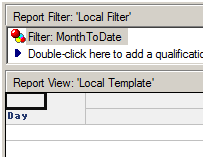
  • Create a new report with the attribute Day in the row and the filter created at step 2, as shown below:
     
ka02R000000kXZ0QAM_0EM440000002Db7.png
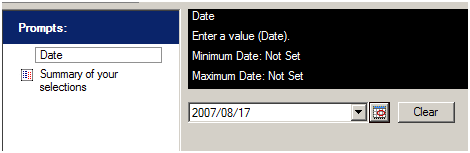
  • Run the report, answer the prompt using an end day for rolling date range, as shown below:
     
ka02R000000kXZ0QAM_0EM440000002DbB.png

SQL view of the report using SQL Server 2008 warehouse is as the following:
 
Sql
select a11.DAY_DATE  DAY_DATE
from LU_DAY a11
where a11.DAY_DATE between CONVERT(DATE, DATEADD(mm, DATEDIFF(mm, 0, '2007-08-17'), 0)) and '2007-08-17'


Comment

0 comments

Details

Knowledge Article

Published:

June 14, 2017

Last Updated:

June 14, 2017