EducationSoftwareStrategy.com
StrategyCommunity

Knowledge Base

Product

Community

Knowledge Base

TopicsBrowse ArticlesDeveloper Zone

Product

Download SoftwareProduct DocumentationSecurity Hub

Education

Tutorial VideosSolution GalleryEducation courses

Community

GuidelinesGrandmastersEvents
x_social-icon_white.svglinkedin_social-icon_white.svg
Strategy logoCommunity

© Strategy Inc. All Rights Reserved.

LegalTerms of UsePrivacy Policy
  1. Home
  2. Topics

KB37474: Folder hierarchy is displayed on prompt page when the option "Allow navigation above the search root" is unchecked in web options of the prompt in MicroStrategy Web 9.x and 10.x


Community Admin

• Strategy


KB37474: Folder hierarchy is displayed on prompt page when the option "Allow navigation above the search root" is unchecked in web options of the prompt in MicroStrategy Web 9.x and 10.x

SYMPTOM:
 
In Strategy Web 9.x and 10.x, folder hierarchy is displayed on prompt page when the option 'Allow navigation above the search root' is unchecked in web options of the prompt, as the image shown below:
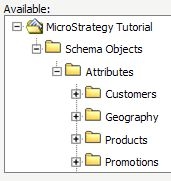
 

ka04W000000OfpnQAC_0EM4400000027W6.jpeg

 
STEPS TO REPRODUCE:
Follow the steps below to reproduce the issue with Strategy Tutorial project:

  • In Strategy Web, select ‘Each on a separate page’ of View prompts setting in Web Preference, as shown below:
     
ka04W000000OfpnQAC_0EM4400000027W8.jpeg
  • Create a search object like this: 
     
    Object type: Attribute
    Look in: \Strategy Tutorial\Schema Objects\Attributes
     
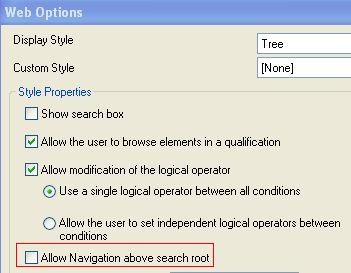
  • Create an expression prompt and use the search object created at step 2 in the prompt. Set prompt web option as the image shown below:
     
    Display Style: Tree
    Uncheck 'Allow navigation above the search root' option.
     
ka04W000000OfpnQAC_0EM4400000027WX.jpeg
  • Duplicate the prompt created at step 3.
  • Add those 2 prompts to a report filter and run the report.
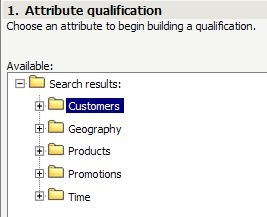
  • On the first prompt page, folder hierarchy is not displayed, as the image shown below:
     
ka04W000000OfpnQAC_0EM4400000027WA.jpeg
  • Go to the next prompt page, note that the folder hierarchy is displayed.

CAUSE:
 
This is a known issue with Strategy Web 9.x and 10.x.
 
ACTION:
 
Contact Strategy Technical Support for an update on the status of this issue.
 
WORKAROUND:
 
Select ‘All on one page’ of View prompts setting in Web Preference, as shown below:
 

ka04W000000OfpnQAC_0EM4400000027WF.jpeg

 
The both prompt pages can be displayed correctly, as shown below:


ka04W000000OfpnQAC_0EM4400000027WC.jpeg


Comment

0 comments

Details

Knowledge Article

Published:

July 21, 2017

Last Updated:

July 21, 2017