EducationSoftwareStrategy.com
StrategyCommunity

Knowledge Base

Product

Community

Knowledge Base

TopicsBrowse ArticlesDeveloper Zone

Product

Download SoftwareProduct DocumentationSecurity Hub

Education

Tutorial VideosSolution GalleryEducation courses

Community

GuidelinesGrandmastersEvents
x_social-icon_white.svglinkedin_social-icon_white.svg
Strategy logoCommunity

© Strategy Inc. All Rights Reserved.

LegalTerms of UsePrivacy Policy
  1. Home
  2. Topics

KB37493: Security Filters are not able to be migrated between projects in MicroStrategy Object Manager 9.x.


Community Admin

• Strategy


Security Filters are not able to be migrated between projects in MicroStrategy Object Manager 9.x

SYMPTOM:
 
Strategy Object Manager 9.0.1 introduces a new feature to allow Security Roles and Security Filters to be migrated along with User/User Group objects between metadatas.  However, when a new security filter is created in one project and does not exist in the other, using object manager does not bring over the newly created security filter.
 
STEPS TO REPRODUCE:
 
Follow these steps to reproduce the issue in Strategy Tutorial. 
  • Create two project sources connecting to two copies of Tutorial metadata.
  • In the first project source create a new user.
  • Staying int he first project source, connect to Strategy Tutorial and open up the Security Filter Manager.  In this editor create a new security filter and apply it to the new user.
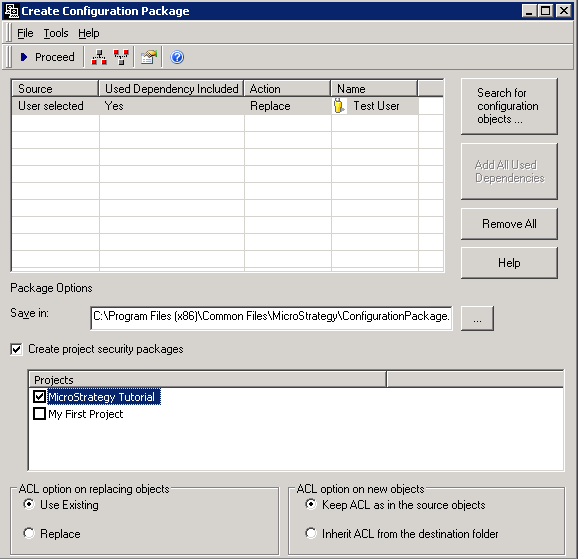
  • Open Object manager and connect to this project source.  Here, create a configuration package and add the user with all of the dependents.  Select 'Create project security packages' and select the Strategy Tutorial project.  Click Proceed to create the package
     
ka04W000000OdeYQAS_0EM440000002DZu.png
  •  
    NOTE: By selecting the "Create project security packages" option, a project security package will be created along with the Configuration Package. The Project Security package includes Security Roles, Security Filters, Connection Mapping, Profile Folder link, and personal preferences which are related to the User and/or User Group objects selected in the window above.
  • Next, open the other project source and first import the Configuration Package.  After this package has been imported, open Strategy Tutorial project and import the other package.  When opening Strategy Desktop, in the second project source the user will be imported but not the security filter.  

CAUSE:
 
This is by design in Object Manager 9.x. The project security package does not include security filter and security role objects. The project security package only contains the links between users, projects, and security filter/roles
 
WORKAROUND:
 
To workaround this issue, the user can create another project package which included security filters and roles that need to be migrated before importing the project security package.


Comment

0 comments

Details

Knowledge Article

Published:

April 10, 2017

Last Updated:

April 10, 2017