EducationSoftwareStrategy.com
StrategyCommunity

Knowledge Base

Product

Community

Knowledge Base

TopicsBrowse ArticlesDeveloper Zone

Product

Download SoftwareProduct DocumentationSecurity Hub

Education

Tutorial VideosSolution GalleryEducation courses

Community

GuidelinesGrandmastersEvents
x_social-icon_white.svglinkedin_social-icon_white.svg
Strategy logoCommunity

© Strategy Inc. All Rights Reserved.

LegalTerms of UsePrivacy Policy
  1. Home
  2. Topics

KB37521: Percentile function is not working correctly if it is created with the insert function wizard in MicroStrategy Developer 10.x


Stefan Zepeda

Salesforce Solutions Architect • Strategy


This article describes an issue where Percentile function is not working correctly if it is created with the insert function wizard in MicroStrategy Developer 10.x

SYMPTOM:
Percentile function is not working correctly if it is created with the insert function wizard in Strategy Desktop 10.x
 
STEPS TO REPRODUCE: 
Follow these steps to reproduce this issue with Strategy Tutorial project 9.2.1. 


ka02R000000kc1vQAA_0EM440000002Dae.png
ka02R000000kc1vQAA_0EM440000002DaR.png
ka02R000000kc1vQAA_0EM440000002Dad.png
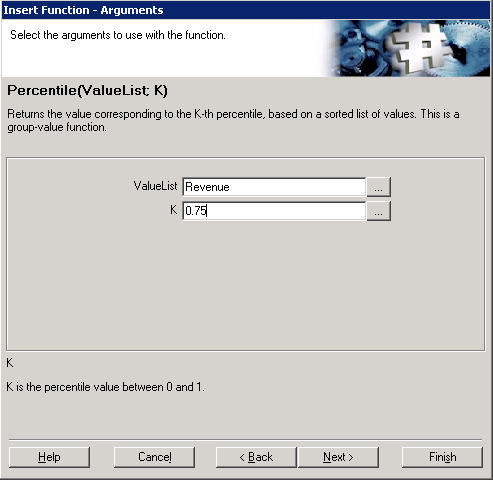
  1. Create a new Percentile metric using the insert function wizard and input "0.75" for the parameter K as shown below:
  2. Click Finish and the metric has been successfully created as shown below.
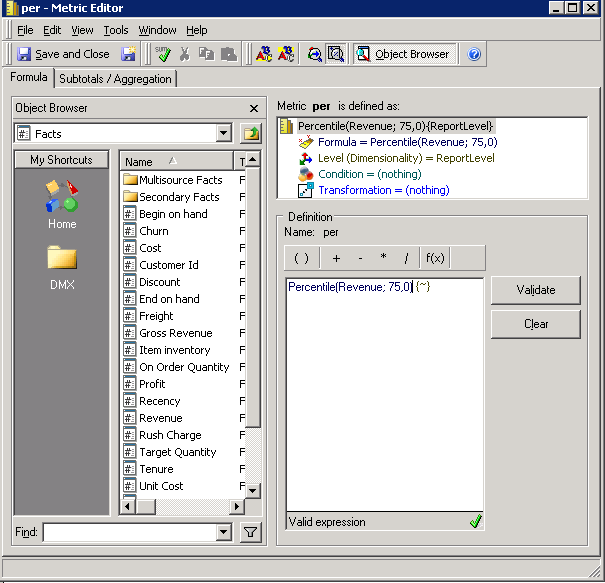
    Note the percentile value K becomes 75.0 which is not correct.
      
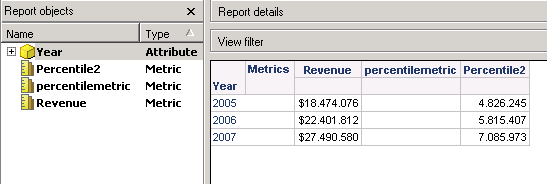
  3. Create a report with attribute Year and metric Revenue and the percentile metric. Run the report as shown below. Note the report result for the percentile metric is empty which is not correct. 

 
CAUSE:
This is a known issue in Strategy Developer.
 
ACTION:
Contact Strategy Technical Support for an update on this issue.
 
WORKAROUND:
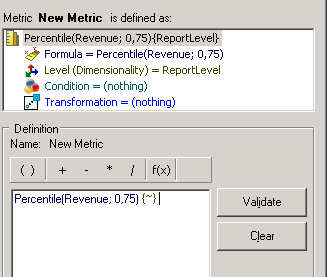
Input the metric expression "Percentile(Revenue; 0.75)" manually instead of the input function wizard as shown below.


ka02R000000kc1vQAA_0EM440000002DaS.png


The report gives the correct result for the manually created percentile metric as shown below.
 

ka02R000000kc1vQAA_0EM440000002DaP.png


Comment

0 comments

Details

Knowledge Article

Published:

June 1, 2017

Last Updated:

June 1, 2017