EducationSoftwareStrategy.com
StrategyCommunity

Knowledge Base

Product

Community

Knowledge Base

TopicsBrowse ArticlesDeveloper Zone

Product

Download SoftwareProduct DocumentationSecurity Hub

Education

Tutorial VideosSolution GalleryEducation courses

Community

GuidelinesGrandmastersEvents
x_social-icon_white.svglinkedin_social-icon_white.svg
Strategy logoCommunity

© Strategy Inc. All Rights Reserved.

LegalTerms of UsePrivacy Policy
  1. Home
  2. Topics

KB37524: When exporting a Report Services Document to Microsoft Excel based on an SAP report containing a numeric textfield, the value is exported as text (not as number) in MicroStrategy Web and Desktop 9.x.


Community Admin

• Strategy


Metric values are exported as numbers when used as dynamic text in Report Services Documents when exported to Microsoft Excel from MicroStrategy Desktop and Web 9.x. 

SYMPTOM:
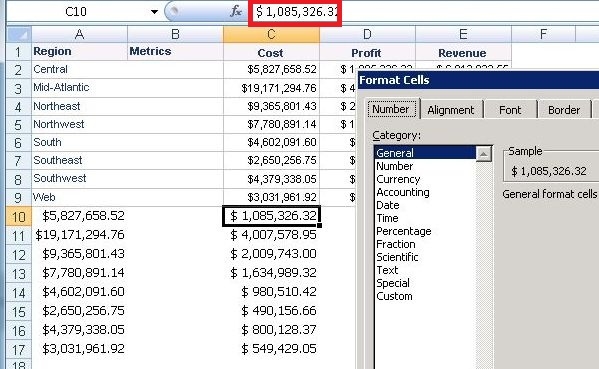
Metric values are exported as numbers when used as dynamic text in Report Services Documents when exported to Microsoft Excel from Strategy Desktop and Web 9.x.  When reports are SAP reports then metric values are exported as text as shown below:
ka04W000000OeiXQAS_0EM440000002AXf.jpeg

 
CAUSE:
The metric value is shown as text when the value format comes from SAP instead of Strategy.  This can be checked if in the report MDX the following line is shown at the end of the MDX query:


cell properties CELL_ORDINAL, FORMATTED_VALUE, VALUE, FORMAT_STRING
ACTION:
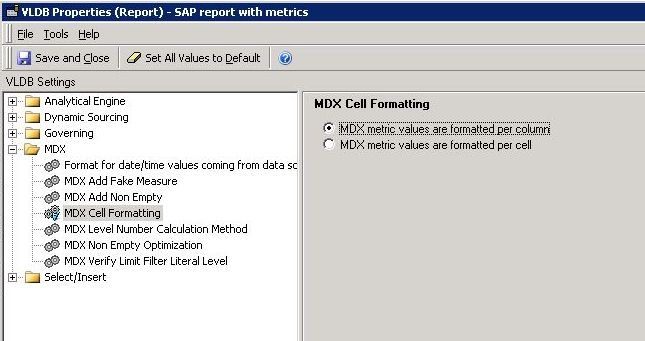
Choose Strategy to do the formatting of the metric values.  This can be done by changing the following VLDB Property in the MDX Report:

ka04W000000OeiXQAS_0EM440000002AXe.jpeg

 
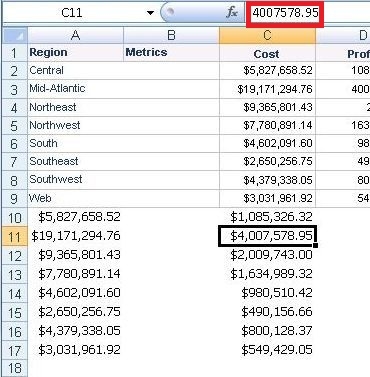
The formatting of the value can now be done in Strategy and the value will be exported as numerico to Microsoft Excel as shown below:
ka04W000000OeiXQAS_0EM440000002AXd.jpeg

37524


Comment

0 comments

Details

Knowledge Article

Published:

June 7, 2017

Last Updated:

June 7, 2017