EducationSoftwareStrategy.com
StrategyCommunity

Knowledge Base

Product

Community

Knowledge Base

TopicsBrowse ArticlesDeveloper Zone

Product

Download SoftwareProduct DocumentationSecurity Hub

Education

Tutorial VideosSolution GalleryEducation courses

Community

GuidelinesGrandmastersEvents
x_social-icon_white.svglinkedin_social-icon_white.svg
Strategy logoCommunity

© Strategy Inc. All Rights Reserved.

LegalTerms of UsePrivacy Policy
  1. Home
  2. Topics

KB37535: Attribute forms are displayed incorrectly in the view filter element browser when the attribute has compound ID in MicroStrategy Developer 9.x and 10.x


Stefan Zepeda

Salesforce Solutions Architect • Strategy


Attribute forms are displayed incorrectly in the view filter element browser when the attribute has compound ID in MicroStrategy Developer 9.x and 10.x

SYMPTOM:
 
Attribute forms display incorrectly in the view filter element browser when the attribute has compound forms in Strategy Developer 9.x and 10.x
 
STEPS TO REPRODUCE:
 
Follow the below steps to reproduce this issue with Strategy Tutorial project in Strategy Developer 9.x and 10.x.
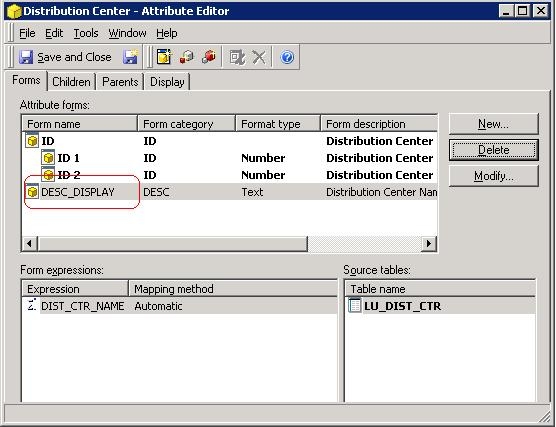
  • Edit attribute Distribution Center and rename the DESC form to be DESC_DISPLAY, as shown below:
     
ka02R000000kVb0QAE_0EM440000002Da5.jpeg
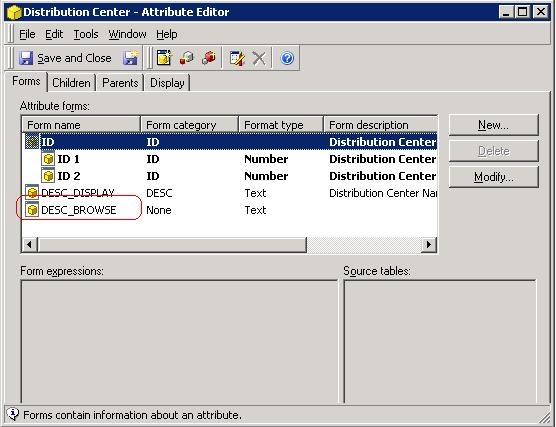
  • Add another form DESC_BOWSE which is mapped to the same column as DESC_DISPLAY, as shown below:
     
ka02R000000kVb0QAE_0EM440000002DaH.jpeg
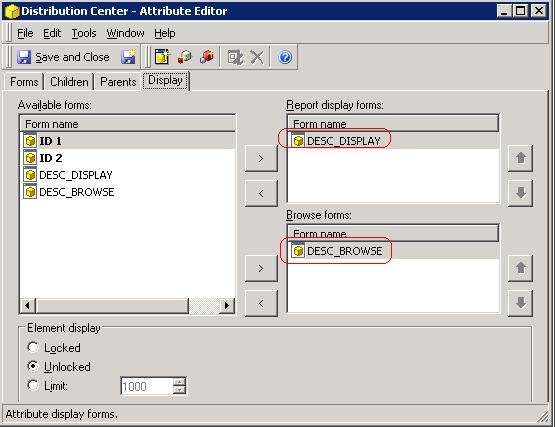
  • Navigate to the Display tab. Set the display form to be DESC_DISPLAY and the browse form to be DESC_BROWSE, as shown below:
     
ka02R000000kVb0QAE_0EM440000002DaI.jpeg
  • Save the changes and update schema
     
  • Create a report with only attribute Distribution Center in the row and execute it
     
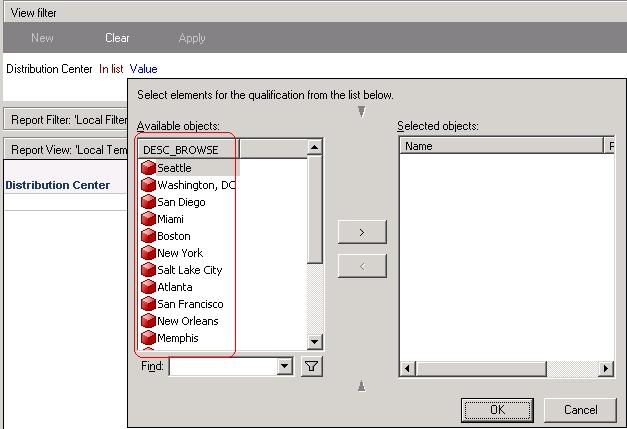
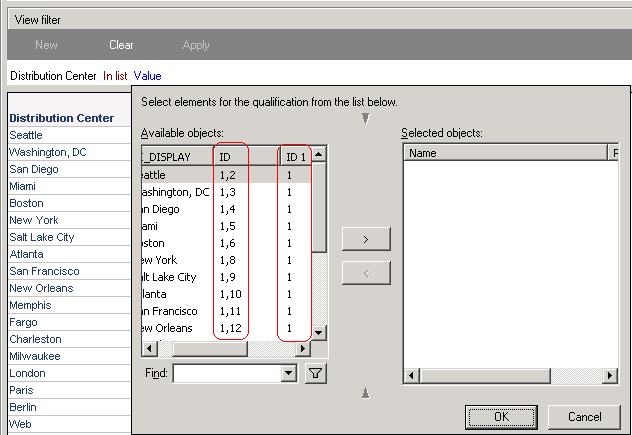
  • Add a view filter on Distribution Center. Note that when browsing the element of the attribute, the ID forms are also displayed in the selection window besides the display form, as shown below:
     
ka02R000000kVb0QAE_0EM440000002DaG.jpeg
  • Go to the Design Mode and add the view filter. Note that only the browse form is displayed, as shown below:
     
ka02R000000kVb0QAE_0EM440000002Da4.jpeg

 
CAUSE:
 
This is a known issue in Strategy Developer 9.x and 10.x.
 
ACTION:
 
Contact Strategy Technical Support for an update of this issue.


Comment

0 comments

Details

Knowledge Article

Published:

May 31, 2017

Last Updated:

May 31, 2017