EducationSoftwareStrategy.com
StrategyCommunity

Knowledge Base

Product

Community

Knowledge Base

TopicsBrowse ArticlesDeveloper Zone

Product

Download SoftwareProduct DocumentationSecurity Hub

Education

Tutorial VideosSolution GalleryEducation courses

Community

GuidelinesGrandmastersEvents
x_social-icon_white.svglinkedin_social-icon_white.svg
Strategy logoCommunity

© Strategy Inc. All Rights Reserved.

LegalTerms of UsePrivacy Policy
  1. Home
  2. Topics

KB37547: "MicroStrategy 9.0 Desktop Files has stopped working" error appears when closing MicroStrategy Desktop after executing a report in MicroStrategy Developer 9.4.x-10.x


Stefan Zepeda

Salesforce Solutions Architect • Strategy


This knowledge base article documents a known issue in which "MicroStrategy 9.0 Desktop Files has stopped working" error appears when closing MicroStrategy Desktop after executing a report in MicroStrategy Developer 9.4.x-10.x

SYMPTOM:
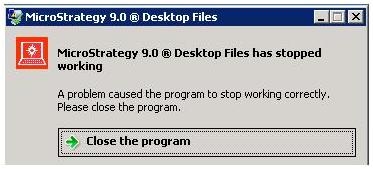
When a user closes Strategy Developer 9.4.x-10.x after executing a report, the following error appears:
         

ka044000000kH0jAAE_0EM440000002DZd.jpeg


Strategy 9.0 Desktop Files
Strategy 9.0 Desktop Files has stopped working
A problem caused the program to stop working correctly. Please close the program
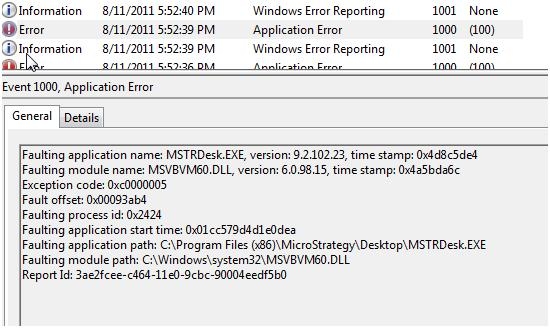
The Event Viewer log shows that MSTRDesk.exe crashed because of a fault in a DLL file:


ka044000000kH0jAAE_0EM440000002DZe.jpeg

 
CAUSE:
This is a known issue when Strategy Developer 9.4.x-10.x is installed in a 64-bit Windows machine.
 
ACTION:
Contact Strategy Technical Support for an update regarding this issue.


Comment

0 comments

Details

Knowledge Article

Published:

June 6, 2017

Last Updated:

June 6, 2017