EducationSoftwareStrategy.com
StrategyCommunity

Knowledge Base

Product

Community

Knowledge Base

TopicsBrowse ArticlesDeveloper Zone

Product

Download SoftwareProduct DocumentationSecurity Hub

Education

Tutorial VideosSolution GalleryEducation courses

Community

GuidelinesGrandmastersEvents
x_social-icon_white.svglinkedin_social-icon_white.svg
Strategy logoCommunity

© Strategy Inc. All Rights Reserved.

LegalTerms of UsePrivacy Policy
  1. Home
  2. Topics

KB37565: Nested metric object prompts do not display metrics that are selected from the inner object prompt when report is executed in MicroStrategy Developer 9.4.x-10.x.


Stefan Zepeda

Salesforce Solutions Architect • Strategy


When a nested metric object prompt, where one object prompt with a predefined list of metrics is used as the object of another object prompt, is added to a report, the metrics selected from the inner object prompt do not show up in the report on execution.

SYMPTOM:
When a nested metric object prompt, where one object prompt with a predefined list of metrics is used as the object of another object prompt, is added to a report, the metrics selected from the inner object prompt do not show up in the report on execution.
 However if only the inner object prompt, with a predefined list of metrics, is added to the report, the metrics that are selected display when the report is run. The nested object prompt works if the initial predefined objects are attributes and not metrics.
 
STEPS TO REPRODUCE:

  1. Create an object prompt with a predefined list of metrics (select a couple of metrics).
  2. Create a second object prompt with another predefined list of metrics.
  3. Create a new object prompt to select the two metric object prompts created previously.
ka02R000000kcUcQAI_0EM440000002DaF.jpeg
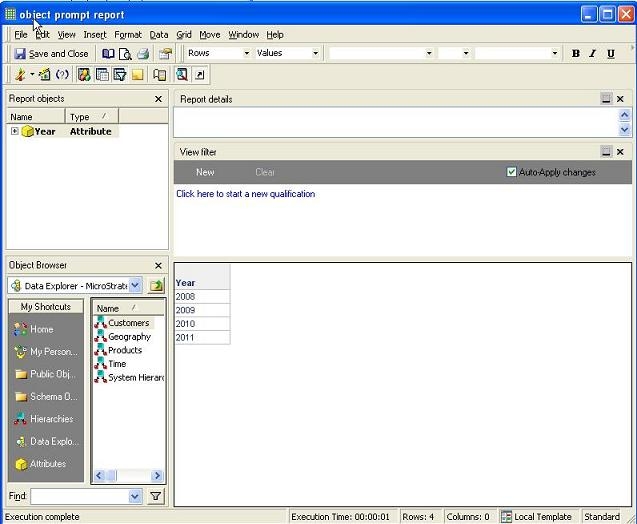
  • Create a new report with Year on the row and object prompt 3 in the column.
  • Run the report and select one of the metric object prompts, then select a metric from the prompt selected when prompted again. Notice the metric selected does not show up when the report is executed. However, if object prompt 1 or 2 are added to the report directly, the metrics selected do show up when the report is run. 
ka02R000000kcUcQAI_0EM440000002DaB.jpeg

 
CAUSE:
This is a known issue with Strategy Developer 9.4.x-10.x.
 
ACTION: 
Strategy will continue to investigate and post updates as soon as they are available.
  
WORKAROUND:
Add the two inner metric object prompts to the report directly and not as nested.


Comment

0 comments

Details

Knowledge Article

Published:

April 17, 2017

Last Updated:

April 17, 2017