SYMPTOM:
When applying the Vertical Bar graph style to a report on a Report Services Document, the rounded effect can be seen in its bars; switching the graph style to the Horizontal Bar does not result in the same rounded effect if the document is executed in Flash view mode in Strategy 9.x:
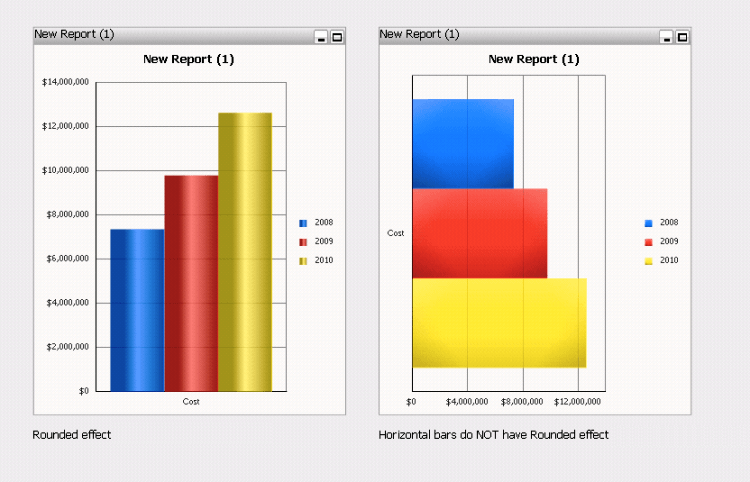
The issue happens in both Strategy Web and Desktop 9.x even if the “Apply rounded effects to all series” option is checked.
STEPS TO REPRODUCE:
1 - Log on the Strategy Tutorial Project and create a simple report from scratch, with Year attribute and Revenue metric, for example
2 - Use the newly created report as data set for a new dashboard
3 - Place the whole report in the dashboard and change it to graph view mode
4 - Select the Vertical Bar graph style, run the dashboard in Flash view mode and see that the rounded effect is displayed
5 - Edit the document and change the graph style to Horizontal Bar, run it in Flash view mode and see that the rounded effect is NOT applied
CAUSE:
This situation refers to a known issue. An Enhancement Request has been logged to the Technology Team.
ACTION:
Contact the Strategy Technical Support for an update on this issue.
WORKAROUND:
Execute the Report Service Document either in Interactive, Editable or Express view mode.
