SYMPTOM:
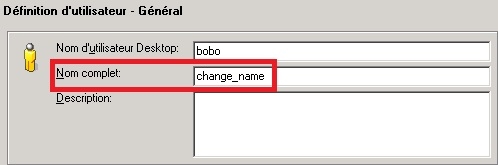
When a user changes the name of a Strategy configuration object, such as a user, using Strategy Developer 9.4.1 and 10.x, it is noticed that this change does not become visible to all users, who can still see the old object name.
CAUSE:
One possible cause of this is that the user who changed the name has Desktop configured to use an interface language different than the one setup as the default language of the metadata. The interface language setting is set at the machine level in Tools > Desktop Preferences > International > Language.
If the language of the interface is different than the default metadata language, changing the object name will result in a new translation being entered for the language used as the interface language, as shown in the screenshot below:
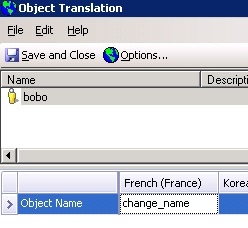
Therefore, the change will only become visible to users whose interface language is the same as the user that changed the object name (French in the example above). Users who have a different interface language, such as the default metadata language, will not see the new object name.
Strategy 9.4.1 and 10.x have a feature known as metadata internationalization, which generates a set of languages by default to promote multilingual systems. Each Strategy 9.4.1 and 10.x metadata has a default language and by default will have an additional set of supported languages. When more than one language is present, the object gets named in the language in which it was modified.
This can be prevented by going to Configuration Managers -> Languages, and deleting all non default languages. Before doing this, users should make sure all configuration objects have their names in the default language. This will not have any adverse effects in projects that are intended to have only one language, and the result is that the project will not have any metadata internationalization functionality. After doing this, anything modified, renamed or created in any locale in Administration will only impact the metadata default language.
