SYMPTOM:
When attempting to send a subscription as CSV the file is sent with UTF-16LE encoding.
The report can be exported as CSV with UTF-8 encoding by changing the Preferences in Strategy Web in “Project Defaults” > Export Reports” and checking the option “Encode CSV for exporting to Excel,” as shown below:
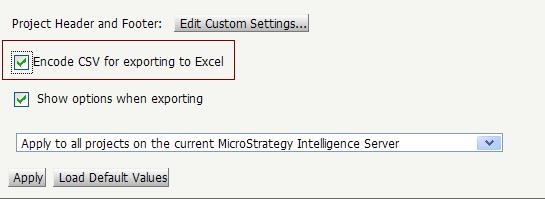
However, a subscription for this report will still be encoded as UTF-16LE.
CAUSE:
Changing the export preferences does not change the encoding when sent through Distribution Services.
ACTION:
To have the CSV files open properly in UTF-8 for subscriptions, the encoding for Distribution Services needs to be changed to UTF-8 from UTF-16. To encode all subscriptions with UTF-8, the following steps can be taken:
Windows:
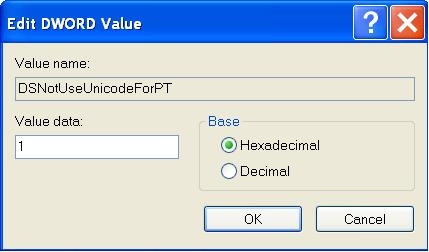
Create an entry for "DSNotUseUnicodeForPT" DWORD value = 1 in the Windows Registry. This should be created under the following key:
HKEY_LOCAL_MACHINE\SOFTWARE\Wow6432Node\Strategy\DSS Server\Castor\
Unix:
Edit the MSIReg.reg file to create the following entry:
"DSNotUseUnicodeForPT"=dword:00000001
