EducationSoftwareStrategy.com
StrategyCommunity

Knowledge Base

Product

Community

Knowledge Base

TopicsBrowse ArticlesDeveloper Zone

Product

Download SoftwareProduct DocumentationSecurity Hub

Education

Tutorial VideosSolution GalleryEducation courses

Community

GuidelinesGrandmastersEvents
x_social-icon_white.svglinkedin_social-icon_white.svg
Strategy logoCommunity

© Strategy Inc. All Rights Reserved.

LegalTerms of UsePrivacy Policy
  1. Home
  2. Topics

KB37622: "The name is already used for a subkey or named value" error message appears when registering an existing system in MicroStrategy Narrowcast Administrator


Community Admin

• Strategy


When attempting to register an existing system using MicroStrategy Narrowcast Administrator the following error may occur and prevent the system from being registered: "The name is already used for a subkey or named value."

SYMPTOM:
When attempting to register an existing system using Strategy Narrowcast Administrator the following error may occur and prevent the system from being registered.
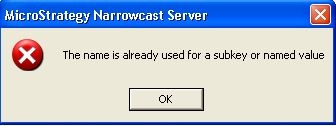
ka04W000000ObLxQAK_0EM440000002Aa0.jpeg


The name is already used for a subkey or named value.
 
CAUSE:
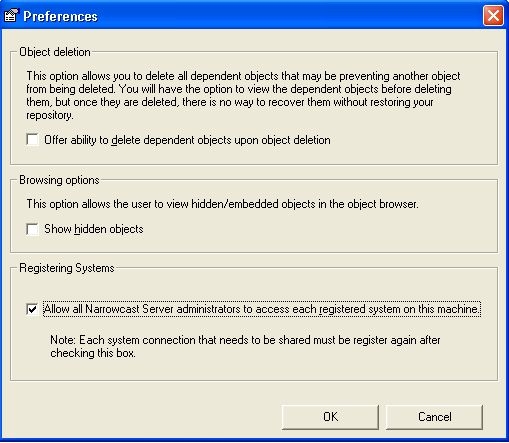
The error is caused because a registry entry already exists in the system for that Narrowcast system. This is most likely to occur when switching the Registering Systems option under Tools > Preferences in Narrowcast Administrator as shown below.

ka04W000000ObLxQAK_0EM440000002AZv.jpeg

This is because this option switches the location of the registry entry from HKEY_CURRENT_USER to HKEY_LOCAL_MACHINE.
 
ACTION:
To resolve this issue follow the steps below:

  1. Switch the "Registering Systems" checkbox such that all the systems registered are visible.
  2. Go to System > <System Name> > Edit System Configuration > Clustering.
  3. Select the option "Remove all machines from the Narrowcast Server system."
  4. Go to System > <System Name> > Unregister system.
  5. Switch the "Registering Systems" option back and register the new system.

Comment

0 comments

Details

Knowledge Article

Published:

June 2, 2017

Last Updated:

June 2, 2017