EducationSoftwareStrategy.com
StrategyCommunity

Knowledge Base

Product

Community

Knowledge Base

TopicsBrowse ArticlesDeveloper Zone

Product

Download SoftwareProduct DocumentationSecurity Hub

Education

Tutorial VideosSolution GalleryEducation courses

Community

GuidelinesGrandmastersEvents
x_social-icon_white.svglinkedin_social-icon_white.svg
Strategy logoCommunity

© Strategy Inc. All Rights Reserved.

LegalTerms of UsePrivacy Policy
  1. Home
  2. Topics

KB37726: In MicroStrategy Intelligence Server 9.x, a document sent to history cannot be opened from MicroStrategy Developer 9.x and results in error "results for this message cannot be retrieved from MicroStrategy Intelligence Server"


Stefan Zepeda

Salesforce Solutions Architect • Strategy


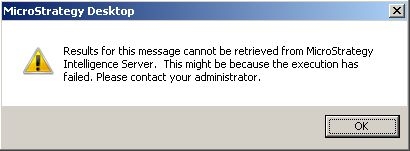
On MicroStrategy Developer 9.x, the following error is seen when users try to retrieve a history list message associated to a report services document. "Results for this message cannot be retrieved from MicroStrategy Intelligence Server. This might be because the execution has failed. Please contact your administrator."

SYMPTOM
On Strategy Developer 9.x, the following error is seen when users try to retrieve a history list message associated to a report services document.
ka02R000000kX8yQAE_0EM440000002AZd.jpeg

Results for this message cannot be retrieved from Strategy Intelligence Server. This might be because the execution has failed. Please contact your administrator.
 
STEPS TO REPRODUCE
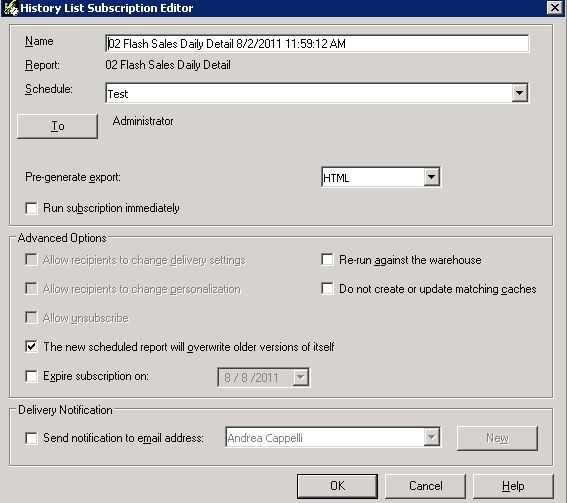
  • Choose a report services document where the default execution mode is Flash.
  • Schedule the report services document to be sent to history. The subscription is as defined below. The pre-generate export option is set to HTML.
ka02R000000kX8yQAE_0EM440000002AZb.jpeg
  • Once the scheduled is executed, the history list message is created and no errors are seen associated with the message.
  • Trying to retrieve the history list message from Strategy Desktop 9.x results in the error provided in the previous section.

CAUSE
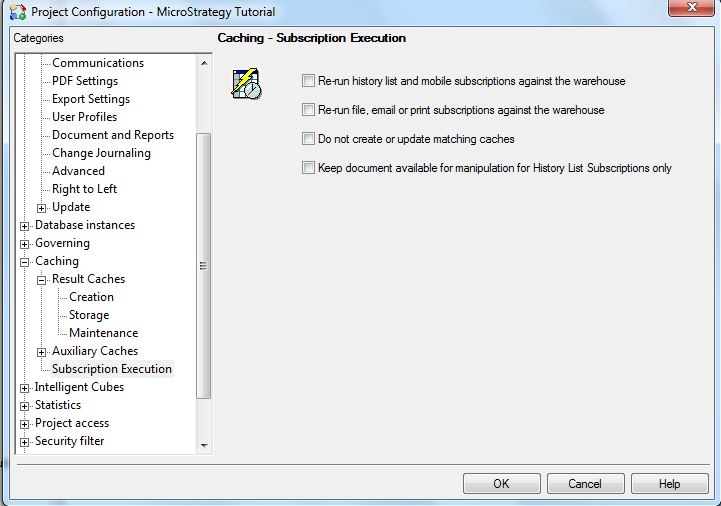
The history list message cannot be retrieved from Strategy Developer 9.x because the subscription is created with pre-generate export option set to 'HTML'. Also, the following project configuration is unchecked: Caching > subscription execution > "Keep document available for manipulation for History List Subscription only". The history list message gets created only in the specified HTML format. Because this setting is unchecked, Strategy Intelligence Server 9.x cannot generate the PDF format when Strategy Developer 9.x tries to retrieve the history list message.
 
More information about these settings can be obtained in the following Strategy Knowledge Base document:
KB20545: New governing subcategory under Project Configuration in MicroStrategy 9 – Subscription Execution
ka02R000000kX8yQAE_0EM440000002AZc.jpeg

 
ACTION
Users should implement one of the actions below:

  • Choose the pre-generate export format to PDF when creating the subscription

(OR)

  • Check the project configuration setting: Caching > subscription execution > "Keep document available for manipulation for History List Subscription only"

Comment

0 comments

Details

Knowledge Article

Published:

April 7, 2017

Last Updated:

April 7, 2017