EducationSoftwareStrategy.com
StrategyCommunity

Knowledge Base

Product

Community

Knowledge Base

TopicsBrowse ArticlesDeveloper Zone

Product

Download SoftwareProduct DocumentationSecurity Hub

Education

Tutorial VideosSolution GalleryEducation courses

Community

GuidelinesGrandmastersEvents
x_social-icon_white.svglinkedin_social-icon_white.svg
Strategy logoCommunity

© Strategy Inc. All Rights Reserved.

LegalTerms of UsePrivacy Policy
  1. Home
  2. Topics

KB37748: In MicroStrategy Web 9.x, the "Grid overflow(PDF&Excel)" option in document properties and formatting only displays when "Show Title Bar" is unchecked


Community Admin

• Strategy


In MicroStrategy Web, the "Grid overflow(PDF&Excel)" option in document properties and formatting only displays when "Show Title Bar" is unchecked. if it is checked, only "Grid Overflow (HTML)" option displays.

SYMPTOM:
 
In Strategy Web 9.x, the "Grid overflow(PDF&Excel)" option in document properties and formatting only displays when "Show Title Bar" is unchecked. if it is checked, only "Grid Overflow (HTML)" option displays.
 
 
STEPS TO REPRODUCE:
 
In Strategy Tutorial 9.x:
  • Create a grid report with Region attribute and Revenue metric
  • Create document and insert the above report as dataset
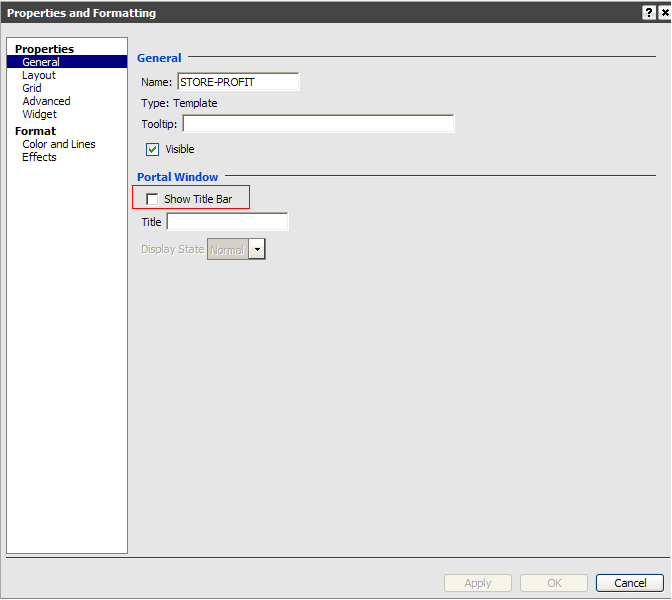
  • Edit the document in design mode, click on the grid report, choose "Properties and Formatting" , select "General" , uncheck the "Show Title Bar" option, then click Apply and OK
     
ka04W000000OgDzQAK_0EM4400000027TA.png
  •  Navigate to the "Layout" section and notice that the "Grid Overflow (PDF & Excel)" option displays
     
ka04W000000OgDzQAK_0EM4400000027T7.png
  • Go back to the "General" tab, and check "Show Title Bar"
     
ka04W000000OgDzQAK_0EM4400000027T2.png
  •  Navigate back to the "Layout" section and notice that the  "Grid Overflow (PDF & Excel)" option disappears
     
ka04W000000OgDzQAK_0EM4400000027T9.png

CAUSE:
 
This is working as designed. When the grid title bar is shown, the grid goes into "Portal Window" mode, which means its dimensions become fixed. Since the Grid Overflow (PDf and Excel) has only two possible options (Clip and Fit to grid contents) and "Fit to grid contents" does not apply, this property is now hidden.
 
ACTION:
 
In order to utilize the functionality of "Grid Overflow (PDf and Excel) ", ensure the grid title bar does not show.


Comment

0 comments

Details

Knowledge Article

Published:

June 21, 2017

Last Updated:

June 21, 2017