EducationSoftwareStrategy.com
StrategyCommunity

Knowledge Base

Product

Community

Knowledge Base

TopicsBrowse ArticlesDeveloper Zone

Product

Download SoftwareProduct DocumentationSecurity Hub

Education

Tutorial VideosSolution GalleryEducation courses

Community

GuidelinesGrandmastersEvents
x_social-icon_white.svglinkedin_social-icon_white.svg
Strategy logoCommunity

© Strategy Inc. All Rights Reserved.

LegalTerms of UsePrivacy Policy
  1. Home
  2. Topics

KB37766: In MicroStrategy Object Manager 9.x and higher, when migrating a report from one environment to another, error ‘The requested object with ID xxx and Type 3 (Report Definition) does not exist in the object context’ is encountered.


Community Admin

• Strategy


This technical note describe the error ‘The requested object with ID xxx and Type 3 (Report Definition) does not exist in the object context’ that is displayed when migrating a report from one environment to another using Object Manager 9.x and higher

SYMPTOM:
Consider the following scenario:

  • Open Strategy Object Manager and connect to the source and destination projects.
  • Try to move a report from source to destination project.
  • The following error is encountered:
     
ka04W000000OeJHQA0_0EM440000002DYh.jpeg
  •  


    The requested object with ID xxx and Type 3 (Report Definition) does not exist in the object context


CAUSE:
One of the causes of this issue could be that the source and target projects have the same project ID and version ID.
 
Object Manager supports migration of objects between "related" projects, where one of the projects was created as a duplicate of the other. When a user migrates an object from one environment to the other, both the project and version ID are checked.  If they are the same, the migration fails.
 
This issue arises when a parallel environment is created by simply backing up the metadata repository, then restoring the backup into a new database. In that case, none of the object IDs change and the projects look identical to Object Manager.
 
ACTION:
There are two things that can be done: 
  • Make sure the destination project is a duplicate of the source.
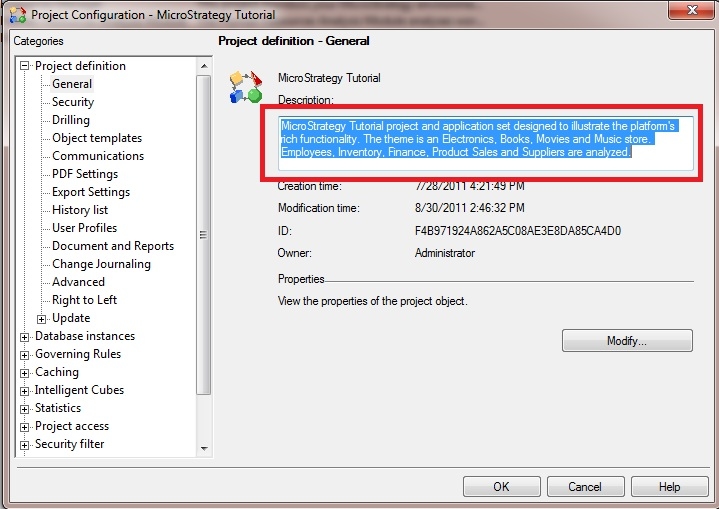
  • Change the version ID of one of the projects. This can be done by editing the project description (right-click on the project-> Project Configuration). A minor change like adding a space is enough to change the version ID in the metadata.

ka04W000000OeJHQA0_0EM440000002DYk.jpeg


Comment

0 comments

Details

Knowledge Article

Published:

June 12, 2017

Last Updated:

June 12, 2017