EducationSoftwareStrategy.com
StrategyCommunity

Knowledge Base

Product

Community

Knowledge Base

TopicsBrowse ArticlesDeveloper Zone

Product

Download SoftwareProduct DocumentationSecurity Hub

Education

Tutorial VideosSolution GalleryEducation courses

Community

GuidelinesGrandmastersEvents
x_social-icon_white.svglinkedin_social-icon_white.svg
Strategy logoCommunity

© Strategy Inc. All Rights Reserved.

LegalTerms of UsePrivacy Policy
  1. Home
  2. Topics

KB37808: Best practices on how to reference an image specified using a relative path for exported documents in MicroStrategy 9.x-10.x


Community Admin

• Strategy


The following knowledge base article describes the paths needed to store an image at to reference them using a relative path and have them correctly included during export jobs in MicroStrategy 9.x-10.x.

If possible, users should use HTTP paths to reference an image other than relative path or absolute path. If it is necessary to use a relative path to reference image, multiple locations need to store the copy of image as shown in the following table:
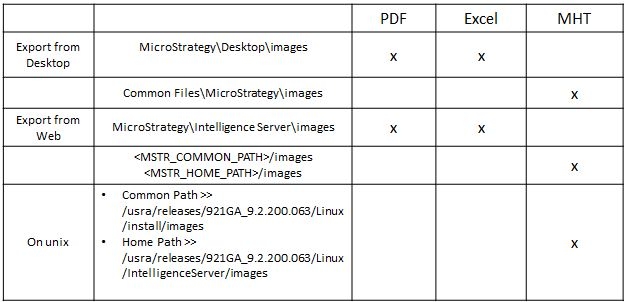
ka04W000000Oc7iQAC_0EM440000002AZL.jpeg

 
Important notes:

  • Strategy Web Server is not involved in storing image when exporting. Image should be stored in Intelligence Server or Strategy Developer Client
  • For Strategy Developer export, local Strategy Developer handles the export, image should be placed on every single Developer machine
  • If you don't know your Common Path or MSTR Home Path you can obtain them from the following registry keys if using windows or msireg.reg if using Unix
    • HKEY_LOCAL_MACHINE --> SOFTWARE -->Strategy --> DSS Server -> Casetor -->Home Path
    • HKEY_LOCAL_MACHINE --> SOFTWARE -->Strategy --> DSS Suite --> Common Path

Comment

0 comments

Details

Knowledge Article

Published:

May 26, 2017

Last Updated:

May 26, 2017