EducationSoftwareStrategy.com
StrategyCommunity

Knowledge Base

Product

Community

Knowledge Base

TopicsBrowse ArticlesDeveloper Zone

Product

Download SoftwareProduct DocumentationSecurity Hub

Education

Tutorial VideosSolution GalleryEducation courses

Community

GuidelinesGrandmastersEvents
x_social-icon_white.svglinkedin_social-icon_white.svg
Strategy logoCommunity

© Strategy Inc. All Rights Reserved.

LegalTerms of UsePrivacy Policy
  1. Home
  2. Topics

KB37846: "You do not have Write access to the Folder object "Users" error occurs when attempting to create or delete a user from a user group in MicroStrategy 9.x.


Stefan Zepeda

Salesforce Solutions Architect • Strategy


"You do not have Write access to the Folder object "Users" error occurs when attempting to create or delete a user from a user group in MicroStrategy 9.x.

SYMPTOM:
This issue occurs for a user which has been given Full Control to a user group in the user group's ACL (Access Control List).
When this user attempts to create a new user, or delete an existing user in the user group mentioned above, the following error is seen even though the user has Full Control over the group for which they are trying to modify.
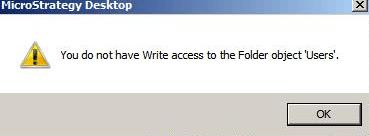
ka02R000000kVfqQAE_0EM440000002DYT.png

CAUSE:
This is known issue in Strategy 9.x.
ACTION:
Strategy will continue to investigate and post updates as soon as they are available.
WORKAROUND:
A possible workaround is to grant Full Control and/or Modify permission to the "User Manager" and choose to "Apply changes in permissions to all children objects" as well as "Overwrite children's ACL recursively".   This will enable the user to create new users or delete existing users.  However, this will apply to all user groups, so it may not be a viable solution for some users.


Comment

0 comments

Details

Knowledge Article

Published:

May 30, 2017

Last Updated:

May 30, 2017