EducationSoftwareStrategy.com
StrategyCommunity

Knowledge Base

Product

Community

Knowledge Base

TopicsBrowse ArticlesDeveloper Zone

Product

Download SoftwareProduct DocumentationSecurity Hub

Education

Tutorial VideosSolution GalleryEducation courses

Community

GuidelinesGrandmastersEvents
x_social-icon_white.svglinkedin_social-icon_white.svg
Strategy logoCommunity

© Strategy Inc. All Rights Reserved.

LegalTerms of UsePrivacy Policy
  1. Home
  2. Topics

KB37857: Metric aggregation is not applied in Microcharts when tree display is selected in MicroStrategy Web 9.x


Community Admin

• Strategy


Metric aggregation is not applied in Microcharts when tree display is selected in MicroStrategy Web 9.x

SYMPTOM:
Metric aggregation is not applied in Microcharts when tree display is selected in Strategy Web 9.x, as shown below:
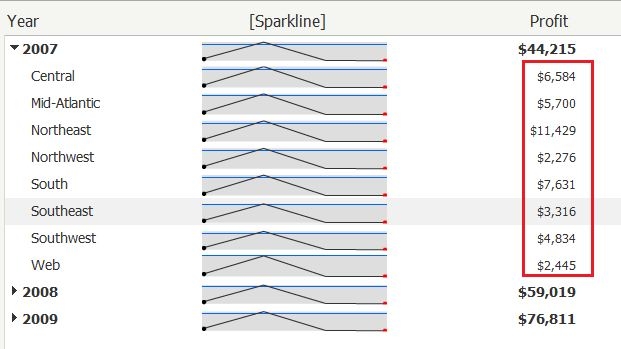
 

ka04W000000Oh29QAC_0EM4400000027SX.jpeg

 
Note that the subtotals for region in microcharts are incorrect, as the grid shown below:
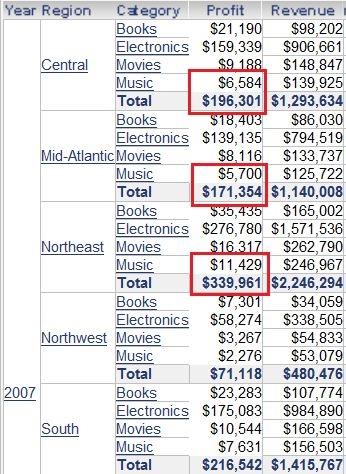
 

ka04W000000Oh29QAC_0EM4400000027SZ.jpeg

 
STEPS TO REPRODUCE:
 
Follow the steps below to reproduce the issue with Strategy Tutorial Project:
  1. Login Strategy Web, create a report with attributes "Year", "Region", "Category" and metrics "Profit", "Revenue"
  2. Save it as "R1" and right-click "R1", select "create document"
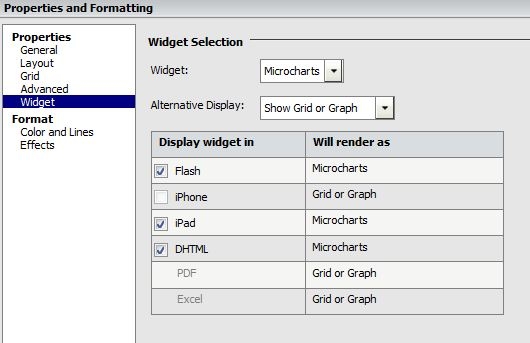
  3. Right-click the grid and select "Properties and formatting", under widget ,select "Microcharts", click OK, as shown below:
ka04W000000Oh29QAC_0EM4400000027SW.jpeg


  • Run this document in flash mode, right-click the document and select "Properties".
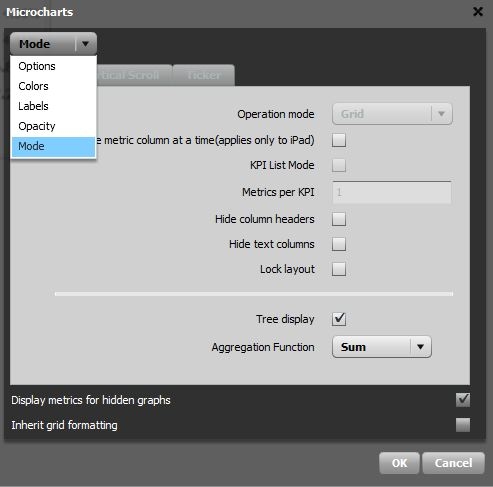
  • Drop down "Options", select mode,  check "tree display" and click "OK", as shown below:
ka04W000000Oh29QAC_0EM4400000027Sb.jpeg

 
CAUSE:
This is a known issue in Strategy Web 9.x.
 
ACTION:
 
Contact Strategy Technical Support for an update regarding this issue.


Comment

0 comments

Details

Knowledge Article

Published:

June 6, 2017

Last Updated:

June 6, 2017