SYMPTOM:
In Strategy OLAP Services, Transformation metrics used in standard reports can resolve against Intelligent Cubes only when the same Transformation metric exists in the Intelligent Cube.
Refer to the tech note below for more information:
KB32502 - Support for transformation metrics for Dynamic Sourcing in Strategy OLAP Services
However, it is not supported to create Transformations for metrics in a report based on an Intelligent Cube which only contains the base metric to be transformed.
CAUSE:
This is working as designed as transformations can't be guaranteed to be calculated identically in Strategy as in the database.
WORKAROUND:
Transformation-style analysis can be achieved by using OLAP function of Lag and Lead provided with Strategy to support some of the functionality. These functions can be used to define metrics that compare values from different time periods without the use of transformation metric.
The steps below show an example on how to take advantage of the Lag function to realize similar functionality as Transformation:
1. Create a report with Quarter and Profit and convert it to an Intelligent Cube, as shown below:

2. Create a report based on the Intelligent Cube in Step 1. Select "Quarter" in row and "Profit" in column.
3. Run the report and right click "Profit"->Insert->New Metric...
4. Create a derived metric called "Last Quarter Profit" using function Lag which is under Functions and Operators->Functions->OLAP Functions, as shown below:

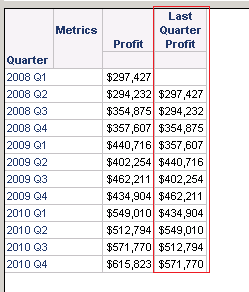
5. This metric will be included on the report showing the data of last quarter. The result is quite similar to a Transformation metric, as shown below:
For more information on function Lag and Lead, consult the Strategy Functions Reference product manual.
