EducationSoftwareStrategy.com
StrategyCommunity

Knowledge Base

Product

Community

Knowledge Base

TopicsBrowse ArticlesDeveloper Zone

Product

Download SoftwareProduct DocumentationSecurity Hub

Education

Tutorial VideosSolution GalleryEducation courses

Community

GuidelinesGrandmastersEvents
x_social-icon_white.svglinkedin_social-icon_white.svg
Strategy logoCommunity

© Strategy Inc. All Rights Reserved.

LegalTerms of UsePrivacy Policy
  1. Home
  2. Topics

KB37884: "MS Excel", "HTML File" and "PDF File" are enabled when exporting Graph Report from Developer 9.4.1 and 10.x although the user does not have these privileges.


Stefan Zepeda

Salesforce Solutions Architect • Strategy


"MS Excel", "HTML File" and "PDF File" are enabled when exporting Graph Report from Developer 9.4.1 and 10.x although the user does not have these privileges.

SYMPTOM
When exporting Graph Report from Developer 9.4.1 and 10.x, "MS Excel", "HTML File" and "PDF File" are enabled although the user does not have these privileges. However, the privilege limitation works as expected for Grid Reports.
 
STEPS TO REPRODUCE
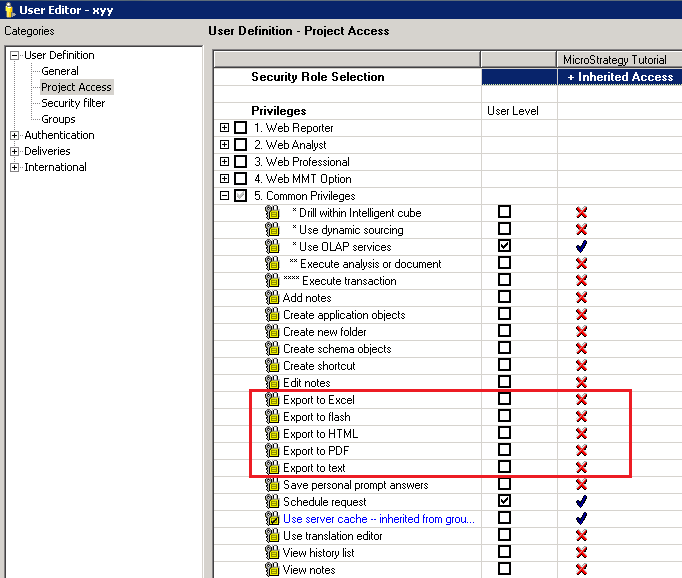
  1. Create a user without the privileges of "Export to Excel", "Export to PDF" and other privileges related to export under Common Privileges, as shown below:
ka02R000000kc8aQAA_0EM440000002DXD.png


  • Log in Desktop as the user created in step 1 and run the Graph Report "Electronics Supplier Sell-Through" under Reports\Subject Areas\Supplier analysis in Tutorial Project.
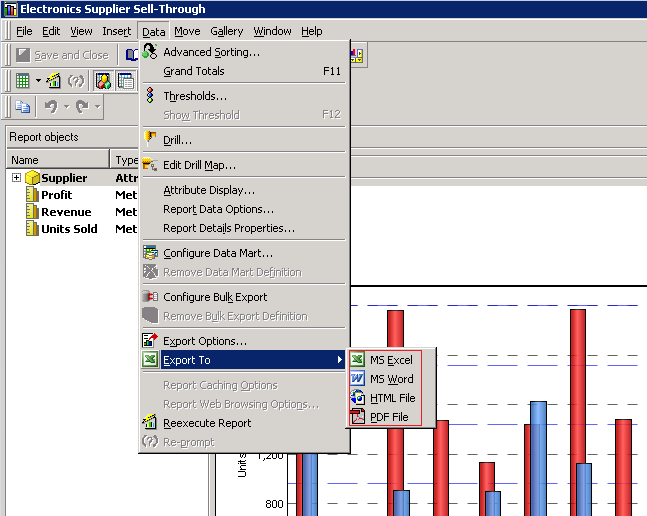
  • Go to Data->Export to and observe that the options of "MS Excel", "HTML File" and "PDF File" are all enabled and workable, as shown below:
ka02R000000kc8aQAA_0EM440000002DX6.png


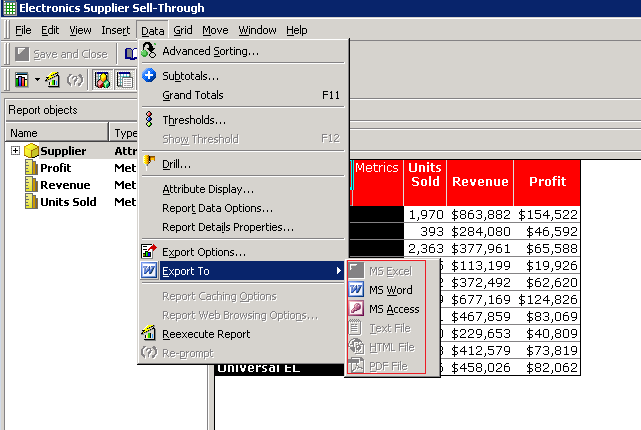
  • Change the Graph report to Grid View. Go to Data->Export to, only "MS Word" and "MS Access" are enabled which work as expected as shown below:
ka02R000000kc8aQAA_0EM440000002DX4.png

 
CAUSE
This is a known issue in Strategy Developer 9.4.1 and 10.x
 
ACTION
Contact Strategy Technical Support for the latest status of the issue.


Comment

0 comments

Details

Knowledge Article

Published:

May 24, 2017

Last Updated:

May 24, 2017