EducationSoftwareStrategy.com
StrategyCommunity

Knowledge Base

Product

Community

Knowledge Base

TopicsBrowse ArticlesDeveloper Zone

Product

Download SoftwareProduct DocumentationSecurity Hub

Education

Tutorial VideosSolution GalleryEducation courses

Community

GuidelinesGrandmastersEvents
x_social-icon_white.svglinkedin_social-icon_white.svg
Strategy logoCommunity

© Strategy Inc. All Rights Reserved.

LegalTerms of UsePrivacy Policy
  1. Home
  2. Topics

KB37886: Time Series Slider widget line is broken for null value in a Report Services document in MicroStrategy Web 9.x


Community Admin

• Strategy


This article explains why Time Series Slider widget line is broken for null value in a Report Services document in MicroStrategy Web 9.x

SYMPTOM:
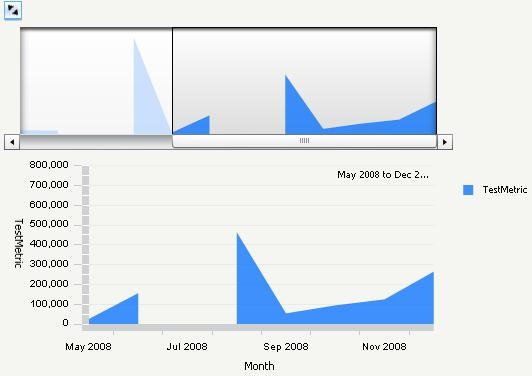
In Strategy Web 9.x, Time Series Slider widget line is broken for null value in a Report Services document, as shown below:
 

ka04W000000OgYJQA0_0EM4400000027SK.jpeg


STEPS TO REPRODUCE:
Follow the steps below to reproduce the issue with Strategy Tutorial project:
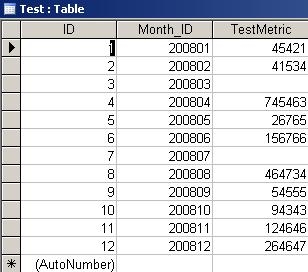
  1. Create a new table in warehouse database with the column ID, Month_ID and Test Metric. Insert some sample data, make the column TestMetric has null values, as shown below:
ka04W000000OgYJQA0_0EM4400000027SE.jpeg
  • In Strategy Developer, create a metric "Testmetric" based on the table created at step1.
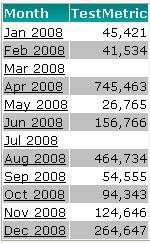
  • In Strategy Web, create a report with Month attribute in the row and metric Testmetric in the column, as shown below:
ka04W000000OgYJQA0_0EM4400000027SG.jpeg
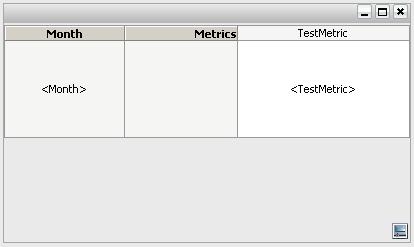
  • Create a Report Services document with the report created at step 3 as dataset. Insert a Time Series Slider widget to panel, drag Month attribute to row and Testmetric metric to column, as shown below:
ka04W000000OgYJQA0_0EM4400000027SC.jpeg

CAUSE:
This is a working by design.
ACTION:
This issue has been logged as an enhancement. Contact Strategy Technical Support for the latest update.
WORKAROUND:
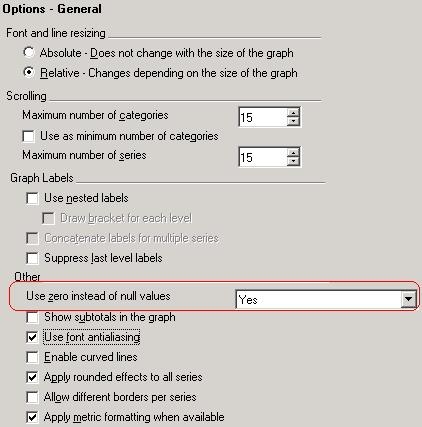
In Strategy Developer, go to Graph Options > Options > General in a graph report, find the setting "Use zero instead of null values", as shown below:
 

ka04W000000OgYJQA0_0EM4400000027SA.jpeg

Select 'Yes' for this setting, the null values are displayed as 0 value in Time Series Slider widget.

  • Run the document in Flash mode, note that Time Series Slider widget line is broken for null value. 

Comment

0 comments

Details

Knowledge Article

Published:

June 14, 2017

Last Updated:

June 14, 2017