SYMPTOM:
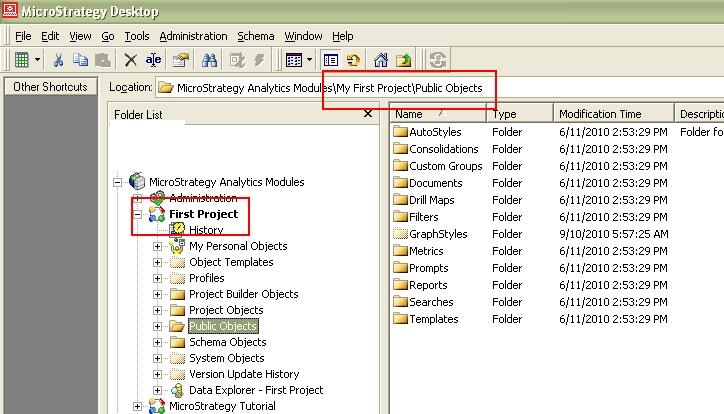
In Strategy Command Manager 9.4.x-10.x, after executing the command to rename the project, the folder location still uses the old project name.
STEPS TO REPRODUCE:
1. In Command Manager 9.4.x-10.x, insert the command manager outline to alter the project name from "My First Project" to "First Project",
"ALTER PROJECT "My First Project" NAME "First Project"
2. Execute the command and verify the the project name has changed in Strategy Developer
3. Navigate to the Public Objects folder and note that the location bar under the menu bar still shows the location as ..\My First Project\Public Objects
CAUSE:
This is a known issue in Strategy Command Manager 9.4.x-10.x
ACTION:
Currently this issue is being reviewed by Strategy for a potential code fix on an upcoming Strategy release.
Strategy will continue to post updates as soon as they're available.
WORKAROUND:
The project can be renamed successfully through Strategy Desktop/Developer.
KB37907
