EducationSoftwareStrategy.com
StrategyCommunity

Knowledge Base

Product

Community

Knowledge Base

TopicsBrowse ArticlesDeveloper Zone

Product

Download SoftwareProduct DocumentationSecurity Hub

Education

Tutorial VideosSolution GalleryEducation courses

Community

GuidelinesGrandmastersEvents
x_social-icon_white.svglinkedin_social-icon_white.svg
Strategy logoCommunity

© Strategy Inc. All Rights Reserved.

LegalTerms of UsePrivacy Policy
  1. Home
  2. Topics

KB37908: How to update the information on an Intelligent Cube without having to republish it in MicroStrategy?


Community Admin

• Strategy


This article describes how to update information in an Intelligent Cube without having to do a full republish

Strategy has introduced a feature known as, Incremental Refresh Options, which allow Intelligent Cubes to be updated based on one or more attributes, by setting up incremental refresh settings to update the Intelligent Cube with only new data. This can reduce the time and system resources necessary to update the Intelligent Cube periodically versus a full republish.
For example, if a user has an Intelligent Cube that contains weekly sales data, the user may want this Intelligent Cube to be updated at the end of every week with the sales data for that week. By setting up incremental refresh settings, he can make it so that only data for one week is added to the Intelligent Cube, without affecting the existing data and without having to reload all existing data.
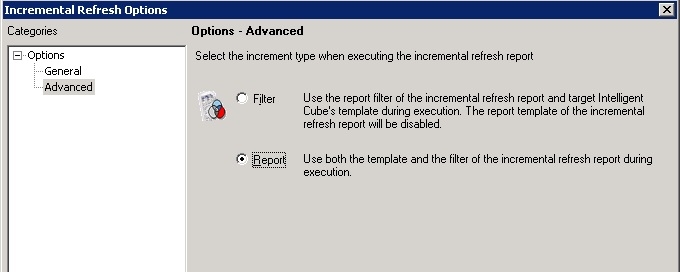
Users can select two types of objects for the incremental fetch: a report or a filter.

  • Filter: The data returned by a filter is compared to the data that is already in the cube. By default, the filter defined for the Intelligent Cube is used as the filter for the incremental refresh.
  • Report: The results of a report are used to populate the Intelligent Cube. By default, the report template used is the same as the Intelligent Cube's template.

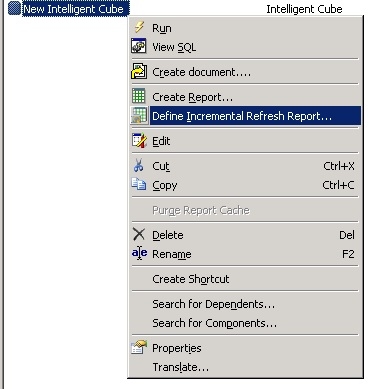
In order to set up an incremental refresh report, the user should first right click on the Intelligent Cube and select "Define Incremental Refresh Report":
ka04W000001MKpcQAG_0EM440000002DY8.jpeg

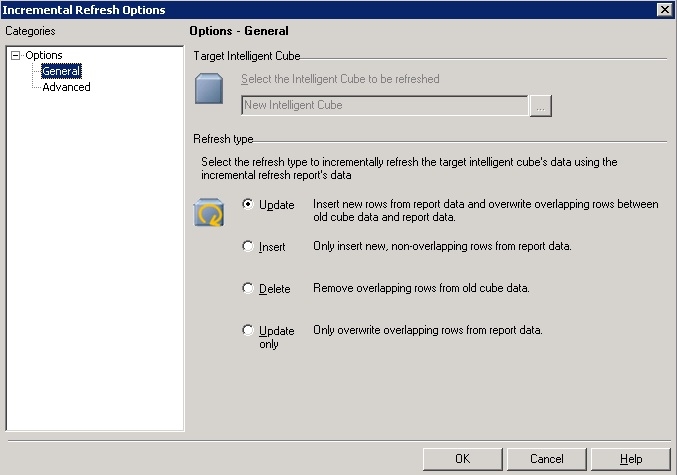
This will bring up the Incremental Refresh Options editor:
ka04W000001MKpcQAG_0EM440000002DYD.jpeg

 
Here, the user can define one of the following Refresh type options:

  • Update:  If new data is available, it is fetched and added to the Intelligent Cube, and if the data returned is already in the Intelligent Cube, it is updated where applicable.
  • Insert:  If new data is available, it is fetched and added to the Intelligent Cube. Data that was already in the Intelligent Cube is not altered.
  • Delete: The data that meets the filter or report's definition is deleted from the cube. For example, if the Intelligent Cube contains data for 2008, 2009 and 2010, and the filter or report returns data for 2009, all the data for 2009 is deleted from the cube.
  • Update only: If the data available is already in the Intelligent Cube, it is updated where applicable. No new data is added to the Intelligent Cube.

The type of object used for the incremental fetch can be selected in the Advanced tab:
ka04W000001MKpcQAG_0EM440000002DYB.jpeg

Users simply have to run the incremental fetch report, and this will automatically refresh the data in the Intelligent Cube.


Comment

0 comments

Details

Knowledge Article

Published:

April 6, 2017

Last Updated:

April 6, 2017