EducationSoftwareStrategy.com
StrategyCommunity

Knowledge Base

Product

Community

Knowledge Base

TopicsBrowse ArticlesDeveloper Zone

Product

Download SoftwareProduct DocumentationSecurity Hub

Education

Tutorial VideosSolution GalleryEducation courses

Community

GuidelinesGrandmastersEvents
x_social-icon_white.svglinkedin_social-icon_white.svg
Strategy logoCommunity

© Strategy Inc. All Rights Reserved.

LegalTerms of UsePrivacy Policy
  1. Home
  2. Topics

KB37952: "ActiveX component can’t create object" error message appears in MicroStrategy Developer 9.x when trying to Update Schema in a Windows Server 2008 R2


Stefan Zepeda

Salesforce Solutions Architect • Strategy


"ActiveX component can’t create object" error message appears in MicroStrategy Developer 9.x when trying to Update Schema in a Windows Server 2008 R2

SYMPTOM:
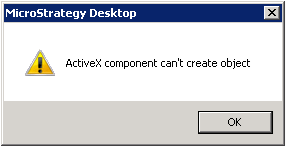
When trying to Update Schema with Strategy Developer the following error message appears: 
"ActiveX component can’t create object"
 

ka02R000000kcLQQAY_0EM440000002DVY.png

 
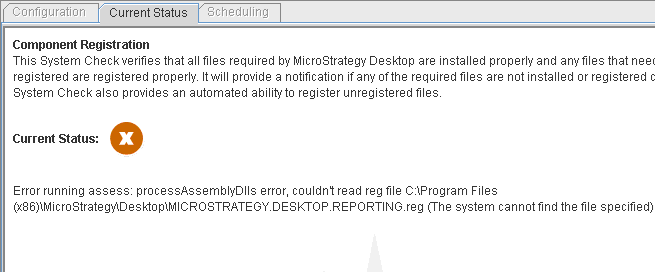
One of the following missing files can be found by Strategy Health Center:
 

ka02R000000kcLQQAY_0EM440000002DVa.png


Component Registration":  Error running assess: processAssemblyDlls error, couldn't read reg file C:\Program Files\Common Files\MicroStrategy\Strategy.DESKTOP.REPORTING.reg (The system cannot find the file specified)


CAUSE:
 
One of the possible causes is that Strategy Developer installation did not complete successfully.
 
ACTION:
 
Please perform a repair installation by opening Add or Remove Programs from Control Panel, navigating to Strategy, clicking on the button change and following the installation wizard to proceed with the repair Strategy.
 
 
If this action does not resolve the issue, use Strategy Health Center to run Developer component registration system check to identify missing files and please contact Strategy Technical Support for further assistance.


Comment

0 comments

Details

Knowledge Article

Published:

May 9, 2017

Last Updated:

May 9, 2017