EducationSoftwareStrategy.com
StrategyCommunity

Knowledge Base

Product

Community

Knowledge Base

TopicsBrowse ArticlesDeveloper Zone

Product

Download SoftwareProduct DocumentationSecurity Hub

Education

Tutorial VideosSolution GalleryEducation courses

Community

GuidelinesGrandmastersEvents
x_social-icon_white.svglinkedin_social-icon_white.svg
Strategy logoCommunity

© Strategy Inc. All Rights Reserved.

LegalTerms of UsePrivacy Policy
  1. Home
  2. Topics

KB37990: The MsiFileTable is not generated after running a 3-tier report through MicroStrategy Desktop 9.x


Stefan Zepeda

Salesforce Solutions Architect • Strategy


This article explains how it is necessary to restart the Intelligence Server in order to enable the MsiFileTable

SYMPTOM:
After enabling the MsiFileTable as shown below:
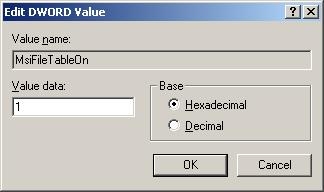
ka02R000000g5S9QAI_0EM440000002DWJ.jpeg

 
It is noticed that the MsiFileTable is not generated in the Intelligence Server machine after running the report in 3 tier through Strategy Developer 9.4.x-10.x.
 
CAUSE:
In this scenario, the Intelligence Server has not been restarted after making the registry change.
 
ACTION:
To generate the MsiFileTable for a 3-tier execution, one must restart the Intelligence Server after making the MsiFileTable change in the registry. Check the tech note below for more details on how to enable the MsiFileTable:
KB12093 - How to enable and use the MsiFileTable Log file for troubleshooting purposes in Strategy Developer or Intelligence Server 9.4..x - 10.x?


Comment

0 comments

Details

Knowledge Article

Published:

April 28, 2017

Last Updated:

April 28, 2017