EducationSoftwareStrategy.com
StrategyCommunity

Knowledge Base

Product

Community

Knowledge Base

TopicsBrowse ArticlesDeveloper Zone

Product

Download SoftwareProduct DocumentationSecurity Hub

Education

Tutorial VideosSolution GalleryEducation courses

Community

GuidelinesGrandmastersEvents
x_social-icon_white.svglinkedin_social-icon_white.svg
Strategy logoCommunity

© Strategy Inc. All Rights Reserved.

LegalTerms of UsePrivacy Policy
  1. Home
  2. Topics

KB37992: "The user does not have Read access to project 'XXX_1'" error is thrown when a user tries to log in to a Project in MicroStrategy Developer 9.x and 10.x


Stefan Zepeda

Salesforce Solutions Architect • Strategy


KB37992: "The user does not have Read access to project 'XXX_1'" error is thrown when a user tries to log in to a Project in MicroStrategy Developer 9.x and 10.x

SYMPTOM:
 
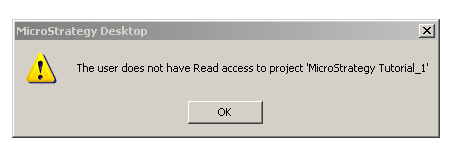
When logging in to a Project in Strategy Developer 9.x and 10.x, the following error is thrown:
ka02R000000kXIFQA2_0EM440000002DXj.png

Sample Code/Error
The user does not have Read access to project 'XXX_1'
 
Note: For this error the project name does not contain the _1 at the end, it is only added in the error message.
 
 
CAUSE:
 
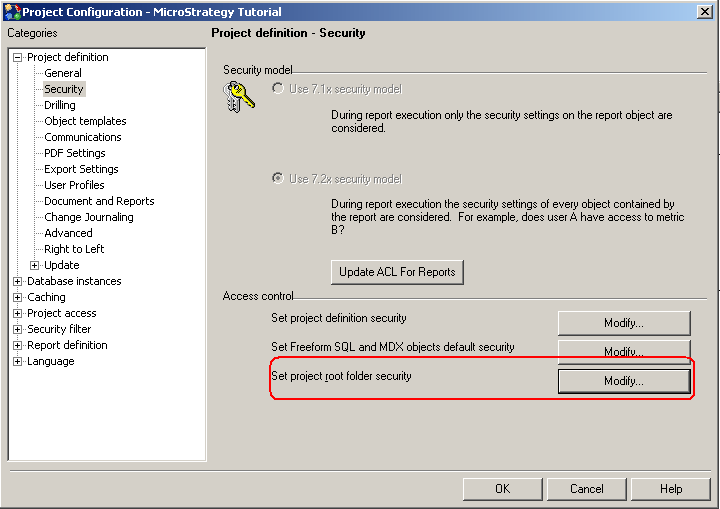
This problem occurs when the user does not have Read access to the Project's root folder.
 
ACTION:
 
Give the user/group Read permission to the root folder in the the Project's Configuration object as shown in the image below:
 

ka02R000000kXIFQA2_0EM440000002DXi.png


 Contact Strategy Technical Support if the issue persists.


Comment

0 comments

Details

Knowledge Article

Published:

June 19, 2017

Last Updated:

June 19, 2017