EducationSoftwareStrategy.com
StrategyCommunity

Knowledge Base

Product

Community

Knowledge Base

TopicsBrowse ArticlesDeveloper Zone

Product

Download SoftwareProduct DocumentationSecurity Hub

Education

Tutorial VideosSolution GalleryEducation courses

Community

GuidelinesGrandmastersEvents
x_social-icon_white.svglinkedin_social-icon_white.svg
Strategy logoCommunity

© Strategy Inc. All Rights Reserved.

LegalTerms of UsePrivacy Policy
  1. Home
  2. Topics

KB38010: MicroStrategy Intelligence Server 9.x or later is not automatically connected immediately to MicroStrategy Web Server


Community Admin

• Strategy


MicroStrategy Intelligence Server 9.x and later is not automatically connected immediately to MicroStrategy Web Server 9.x and later after MicroStrategy Web Server restart. User will see the following error "There are no projects connected to this web server. To configure projects, go to the Web Administrator". This behavior only happens for the first 5 minutes after the Intelligence Server has been restarted

SYMPTOM:
Strategy Intelligence Server 9.x or later is not automatically connected immediately to Strategy Web Server 9.x or later after Strategy Web Server restart. User will see the following error "There are no projects connected to this web server. To configure projects, go to the Web Administrator". This behavior only happens for the first 5 minutes after the Intelligence Server has been restarted.
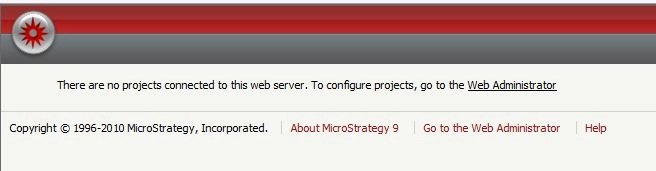
 

ka04W000000OdzmQAC_0EM4400000027PT.jpeg

 
CAUSE:
This behavior is by design since Strategy 8.x. By default, the polling cycle for Strategy Web Server and Strategy Intelligence Server is 5 minutes. It could take the Web Server up to 5 minutes to poll for Intelligence Server and establish the connection. This polling cycle is designed for the benefit of Web Server performance if polling too frequently the web server performance could degrade.
 
ACTION:
Wait for 5 minutes for Strategy Web to establish full connection with Strategy Intelligence Server.
 
WORKAROUND:

  • The polling frequency can be adjusted in the Strategy.xml in the Strategy Web deployment. By default located under (<MSTR-home>/WEB-INF/). However, as mentioned in CAUSE, this polling cycle is designed for the benefit of Web Server performance if polling too frequently the web server performance could degrade.
ka04W000000OdzmQAC_0EM440000002Q7O.png
  • If user does not want to wait for up to 5 minutes, an administrator user can simply click on the Strategy Web Administrator page and the connection will be established immediately.

Comment

0 comments

Details

Knowledge Article

Published:

June 14, 2017

Last Updated:

June 14, 2017