EducationSoftwareStrategy.com
StrategyCommunity

Knowledge Base

Product

Community

Knowledge Base

TopicsBrowse ArticlesDeveloper Zone

Product

Download SoftwareProduct DocumentationSecurity Hub

Education

Tutorial VideosSolution GalleryEducation courses

Community

GuidelinesGrandmastersEvents
x_social-icon_white.svglinkedin_social-icon_white.svg
Strategy logoCommunity

© Strategy Inc. All Rights Reserved.

LegalTerms of UsePrivacy Policy
  1. Home
  2. Topics

KB38022: "Welcome . (If you are not ##, click here.)" message appears when logging into MicroStratetgy Web 9.x and 10.x


Stefan Zepeda

Salesforce Solutions Architect • Strategy


"Welcome . (If you are not ##, click here.)" message appears when logging into MicroStratetgy Web 9.x and 10.x

SYMPTOM:
 
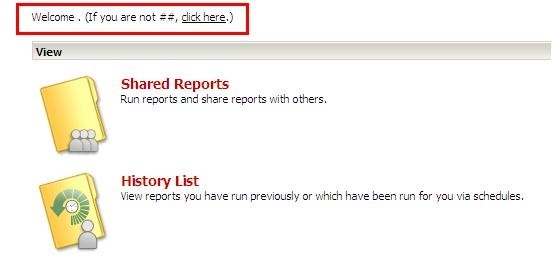
When the user logs in Strategy Web 9.x and 10.x, the following message appears on the top left corner:
 

ka02R000000kbx1QAA_0EM440000002DWp.jpeg

Sample Code/Error
Welcome . (If you are not ##, click here.)
  
Most of the time, this issue happens to newly create user objects.
 
CAUSE:
 
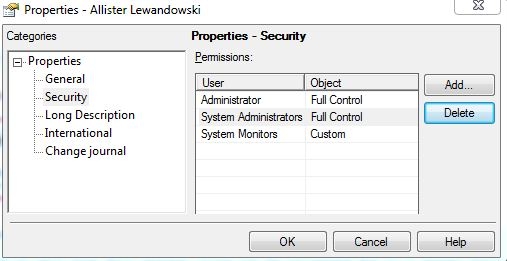
One possible cause is that this user account does not have ACL entries for Everyone and Public/Guest groups with Browse and Read permission. To verify this, right mouse click on the user object and select "Properties" and go to "Security",
 

ka02R000000kbx1QAA_0EM440000002DWr.jpeg

 
In the above screenshot, the missing two ACL entries are:
- Everyone > Custom (Browse, Read)
- Public / Guest > Custom (Browse, Read)
 
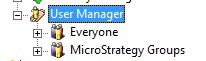
In addition, since this issue happens to new user objects, the ACL of "User Manager" object may also be missing the above two ACL entries:
 

ka02R000000kbx1QAA_0EM440000002DWn.jpeg

 
WORKAROUND:
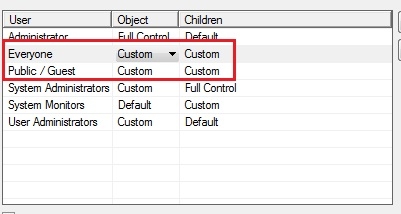
In order to stop the issue from happening, the administrator should modify the "User Manager" object and add the missing ACL permissions:
  • Launch Strategy Desktop.
  • Expand "Administration" and right mouse click on "User Manager".
  • Select "Properties" and go to "Security"
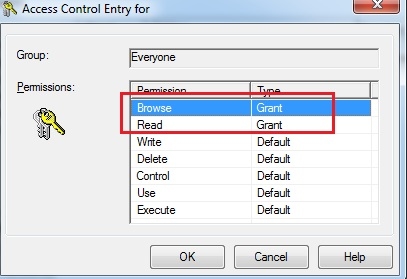
  • Add Everyone and Public/Guest groups in the ACL entries and choose "custom" permission for both "Object" and "Children".
     
ka02R000000kbx1QAA_0EM440000002DWt.jpeg
  • Assign "Browse" and "Read" in the custom permission:
     
ka02R000000kbx1QAA_0EM440000002DWk.jpeg


Comment

0 comments

Details

Knowledge Article

Published:

June 5, 2017

Last Updated:

June 5, 2017