EducationSoftwareStrategy.com
StrategyCommunity

Knowledge Base

Product

Community

Knowledge Base

TopicsBrowse ArticlesDeveloper Zone

Product

Download SoftwareProduct DocumentationSecurity Hub

Education

Tutorial VideosSolution GalleryEducation courses

Community

GuidelinesGrandmastersEvents
x_social-icon_white.svglinkedin_social-icon_white.svg
Strategy logoCommunity

© Strategy Inc. All Rights Reserved.

LegalTerms of UsePrivacy Policy
  1. Home
  2. Topics

KB38024: "Unexpected error. Invalid procedure call or argument" error message appears when launching Warehouse Catalog in MicroStrategy Developer 9.x and 10.x


Stefan Zepeda

Salesforce Solutions Architect • Strategy


KB38024: "Unexpected error. Invalid procedure call or argument" error message appears when launching Warehouse Catalog in MicroStrategy Developer 9.x and 10.x

SYMPTOM:
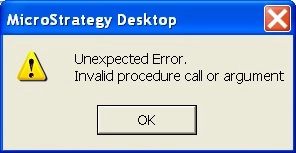
When the user opens the Warehouse Catalog in Strategy Developer 9.x and 10.x, the following error occurs:
 

ka02R000000kXFJQA2_0EM440000002DWO.jpeg

Sample Code/Error
Unexpected error.  Invalid procedure call or argument
 
 
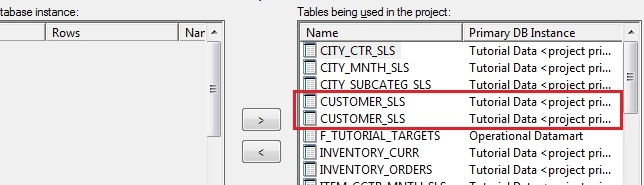
The user can also observe duplicate table names are listed in the right panel of the Warehouse Catalog:
 

ka02R000000kXFJQA2_0EM440000002DWN.jpeg

 
CAUSE:
The exact cause of this issue is unknown at this point. In order to track down the cause of the inconsistency, customers encountering this issue should make note of Schema-related changes, Object Migrations, or error messages prior to experiencing the problem.  Change Journaling, if it has been enabled, can help in preserving this information.
 
WORKAROUND:
This issue can be addressed by running ScanMD "Warehouse Tables Verification" in fix mode, or please contact Strategy Technical Support for further assistance.


Comment

0 comments

Details

Knowledge Article

Published:

June 20, 2017

Last Updated:

June 20, 2017