SYMPTOM:
Strategy users that have the "User must change password at next logon" option set are not prompted to change the password when the first logon is on the Intelligence Server Administrator page (http://<server_name>/MicroStrategy/asp/Srvradmin.aspx).
Instead, the following message is shown:
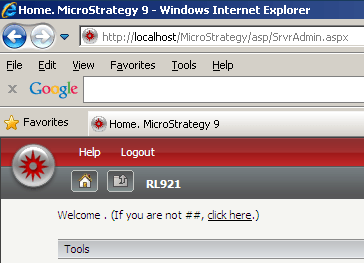
Welcome . (If you are not ##, click here)
CAUSE:
This is a known issue in Strategy Web 9.x. An Enhancement Request has been logged to the Technology team to fix this issue.
ACTION:
Contact Strategy Technical Support for an update on this issue.
WORKAROUND:
User must first log on the Project page whose default URL is http://<server_name>/MicroStrategy/asp/Main.aspx, change the password and then log on the Server Administrator page whose default URL is http://<server_name>/MicroStrategy/asp/Srvradmin.aspx.
