SYMPTOM:
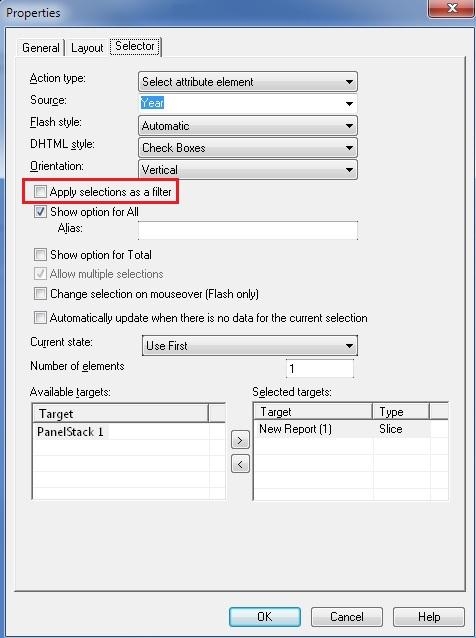
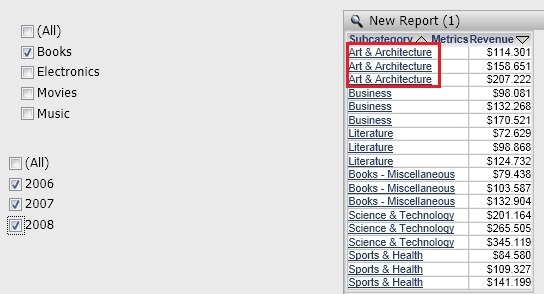
When a grid is targeted by a selector that allows multiple selections and that has the "Apply filter as selector" option disabled, a user will see multiple rows appear in the grid. One row will appear per each selection made on the selector.
This behavior persists across all modes.
STEPS TO REPRODUCE:
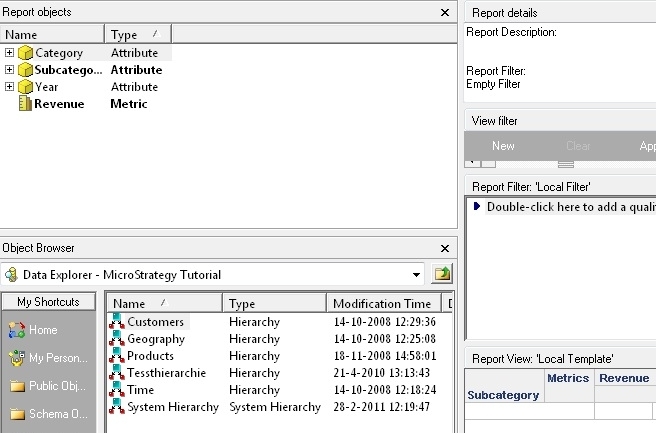
It is possible to reproduce this issue in the Tutorial project by taking the steps as outlined below:
CAUSE:
This is working as designed. The duplicated rows are not actual repeated rows, but different rows for the same Subcategory that correspond to different Years. When a selector is being used as a slicer and not as a filter, the calculation of the metric values is only done once, prior to the display of the document. A slicer selector has no way of knowing that multiple selections will be done, thus cannot aggregate the different combinations on the fly. A filter selector makes a new trip or request to the IServer for the data thus being able to aggregate the new combination of selections. Refer to tech note KB17761 for more information.
WORKAROUND:
For aggregation of multiple selections enable "Apply filter as selector".
To identify visually that each row corresponds to a different selection, add the attribute in the selector to the grid's template.
