EducationSoftwareStrategy.com
StrategyCommunity

Knowledge Base

Product

Community

Knowledge Base

TopicsBrowse ArticlesDeveloper Zone

Product

Download SoftwareProduct DocumentationSecurity Hub

Education

Tutorial VideosSolution GalleryEducation courses

Community

GuidelinesGrandmastersEvents
x_social-icon_white.svglinkedin_social-icon_white.svg
Strategy logoCommunity

© Strategy Inc. All Rights Reserved.

LegalTerms of UsePrivacy Policy
  1. Home
  2. Topics

KB3806: How to create intermediate tables in MicroStrategy Developer 9.x table spaces


Stefan Zepeda

Salesforce Solutions Architect • Strategy


In the following document the word 'space' is used to refer to table space or database. Depending upon the warehouse platform, 'space' refers to a table space or a database or a combination of both.
 
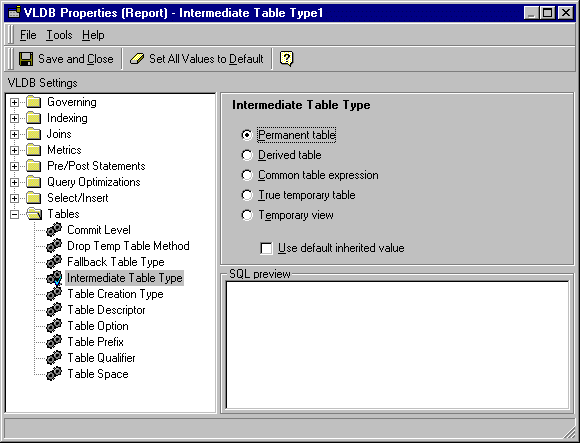
There are two approaches to creating intermediate tables in a specific space. The prerequisite for both approaches is that the Intermediate Table Type Very Large Database (VLDB) setting is set to 'Permanent Table.'
 
NOTE: Approach I is for new users who are not familiar with the SQL syntax and Approach II relies on the user's knowledge of SQL syntax.
 
CAUTION: If both the above approaches are implemented simultaneously, incorrect SQL is generated.
 
APPROACH I
2 Tier Mode
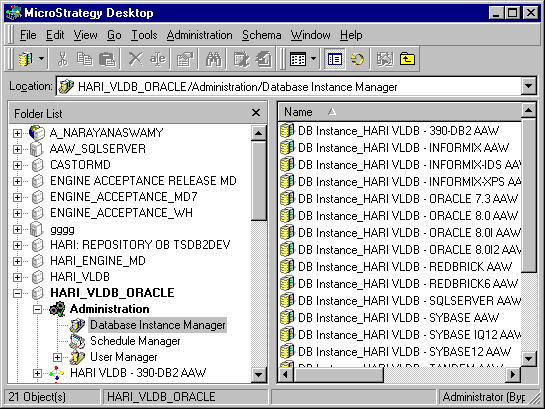
 

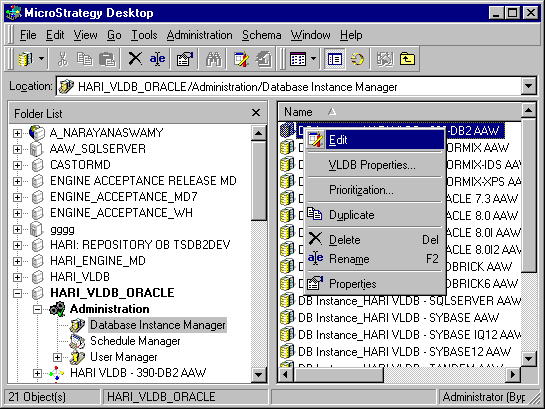
  • In 2-tier mode, once users log in to the metadata, the list of projects in the repository and the Administration icon appear. Open the Administration icon and go to 'Database Instance Manager.' A list of Database Instances is displayed, as illustrated below.

ka02R000000kVlJQAU_0EM440000002GKg.gif
  • Right-click on the DBRole that corresponds to the project in which the intermediate tables are to be created in a specific space.
  • Click on 'Edit' as displayed below.

ka02R000000kVlJQAU_0EM440000002GL3.gif
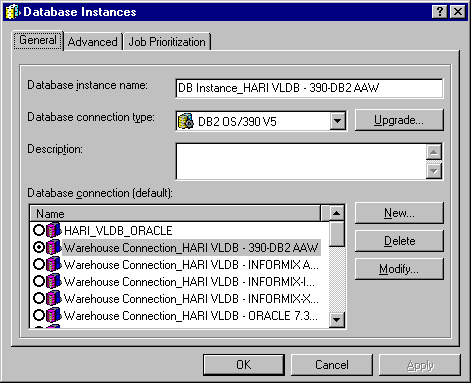
  • A window appears, as displayed below. Click on the Advanced tab.

ka02R000000kVlJQAU_0EM440000002GLD.gif
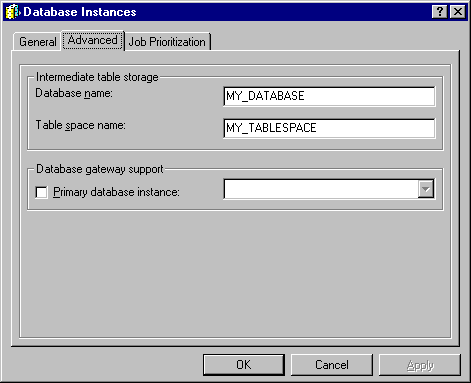
  • In the 'Intermediate table storage' section, there are two text boxes in which to enter the database name and table space name. Depending upon to which database the warehouse DBRole points, enter the database name or the table space name or both.

    In the example below, the warehouse DBRole points to a database on DB2 OS/390 and both database and table space names are provided. Click on the Apply button and click on 'OK' to close all remaining windows.

ka02R000000kVlJQAU_0EM440000002GL6.gif
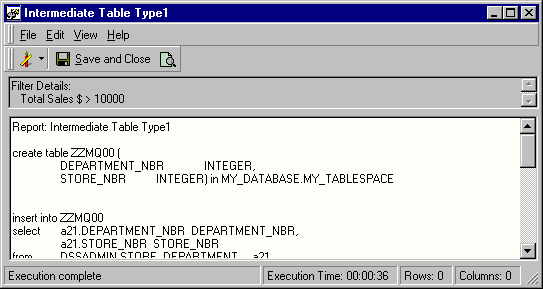
  • Open the project and execute a multi-pass report. The CREATE TABLE statement should contain the syntax for generating the intermediate table in the space specified. The output for this example is provided below.

ka02R000000kVlJQAU_0EM440000002GKi.gif

NOTE: In the above example, this SQL is specific to DB2 OS/390 because the warehouse database is DB2 OS/390. This syntax changes depending upon the warehouse platform.
 
3 Tier Mode

  1. When trying to create intermediate tables in a specific space in 3-tier mode, Steps 1 through 5 listed above must be followed.
  2. Open the relevant project, click on the Menu 'Schema' in Strategy Desktop and go to 'Update Schema.' Click on 'OK.'
  3. Once the schema is updated, execute any multi-pass report. The results should be similar to that seen in 2-tier mode. Some databases require only the database name, some only the table space name and a few of them need both the database name and the table space name. The user must complete the appropriate text boxes to generate the proper SQL. If the user supplies incorrect or incomplete information, incorrect SQL may be generated.

 
APPROACH II
This approach utilizes the Table Space and Table Prefix VLDB settings to create intermediate tables in a specific space. Depending upon the warehouse platform, either or both settings are utilized to generate the proper syntax. The following steps are applicable for both 2-tier and 3-tier environments.
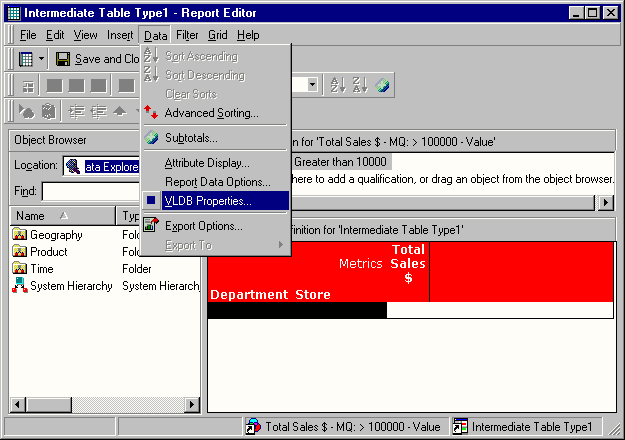
  • Right-click on the report and click on the 'Edit' menu.
  • In the Report Editor click on 'Data'> 'VLDB Properties' option, as illustrated below.

ka02R000000kVlJQAU_0EM440000002GKr.gif
  • In the VLDB Editor open the 'Tables' folder and click on 'Intermediate Table Type.' Uncheck the 'Use default inherited value' check box, if it is checked, and set the option to 'Permanent Table,' as illustrated below.

ka02R000000kVlJQAU_0EM440000002GL5.gif
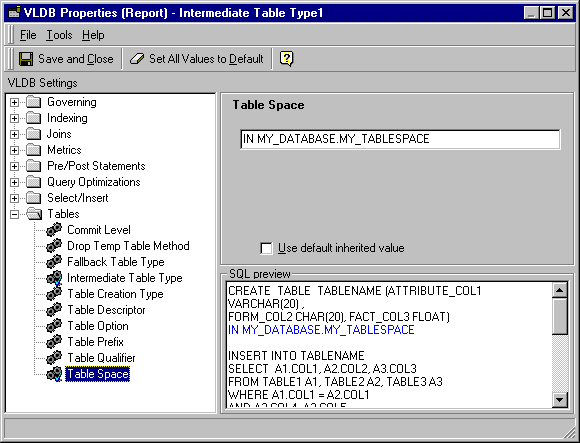
  • Click on the 'Table Space' setting under the 'Tables' folder. Uncheck the 'Use default inherited value' check box if it is checked and enter the string to be appended at the end of the CREATE TABLE statement, as illustrated below.

ka02R000000kVlJQAU_0EM440000002GL7.gif
  • Click on 'Save' and 'Close' in the VLDB editor and then click on 'Save' and 'Close' in the report editor.
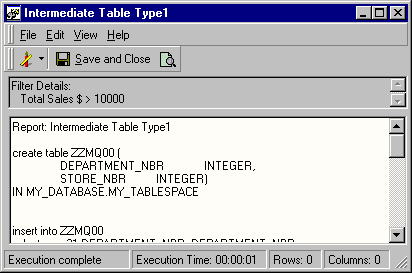
  • Execute the report. The SQL generated should contain the string entered at the end of the CREATE TABLE statement, as displayed below.

ka02R000000kVlJQAU_0EM440000002GKd.gif

NOTE: In this approach the user must know the proper database syntax to create the intermediate tables in a specific space. In this example, SQL specific to DB2 OS/390 is generated, hence, only the Table Space VLDB setting is utilized. Furthermore, the VLDB settings were set at the report level, which means that the Table Space SQL syntax is generated for that particular report only. To force the creation of intermediate tables in a specific space for all the reports in a project, the VLDB setting changes should be carried out at the Database Instance level.


Comment

0 comments

Details

Knowledge Article

Published:

May 24, 2017

Last Updated:

May 24, 2017