SYMPTOM:
When accessing Strategy Web 9.4.x-10.x main page (http://localhost/MicroStrategy/asp/main.aspx) in Microsoft Windows Server 2008 64 bits, the following error message appears:
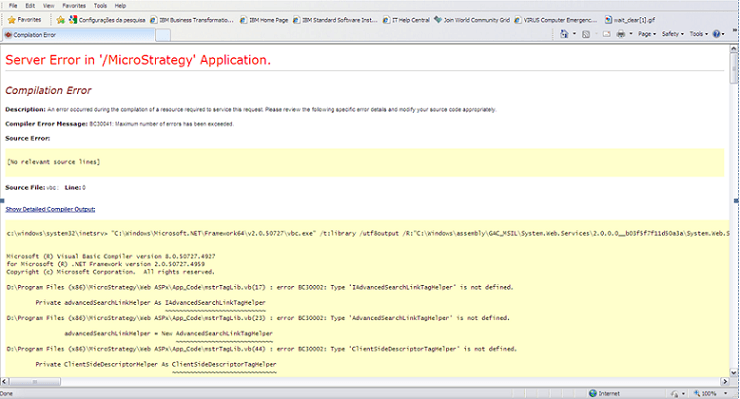
Server Error in '/Strategy' Application. ________________________________________ Compilation Error Description: An error occurred during the compilation of a resource required to service this request. Please review the following specific error details and modify your source code appropriately. Compiler Error Message: BC30041: Maximum number of errors has been exceeded. Source Error: Source File: vbc : Line: 0 Show Detailed Compiler Output: c:\windows\system32\inetsrv> "C:\Windows\Microsoft.NET\Framework64\v2.0.50727\vbc.exe" /t:library /utf8output /R:"C:\Windows\assembly\GAC_64\System.Web\2.0.0.0__b03f5f7f11d50a3a\System.Web.dll" /R:"C:\Windows\assembly\GAC_MSIL\System.Xml\2.0.0.0__b77a5c561934e089\System.Xml.dll" /R:"C:\Windows\assembly\GAC_MSIL\System.ServiceModel.Web\3.5.0.0__31bf3856ad364e35\System.ServiceModel.Web.dll" /R:"C:\Windows\assembly\GAC_MSIL\System.Drawing\2.0.0.0__b03f5f7f11d50a3a\System.Drawing.dll" /R:"C:\Windows\assembly\GAC_MSIL\System.Web.Mobile\2.0.0.0__b03f5f7f11d50a3a\System.Web.Mobile.dll" /R:"C:\Windows\assembly\GAC_MSIL\System.ServiceModel\3.0.0.0__b77a5c561934e089\System.ServiceModel.dll" /R:"C:\Windows\assembly\GAC_MSIL\System.WorkflowServices\3.5.0.0__31bf3856ad364e35\System.WorkflowServices.dll" /R:"C:\Windows\assembly\GAC_MSIL\System.Configuration\2.0.0.0__b03f5f7f11d50a3a\System.Configuration.dll" /R:"C:\Windows\assembly\GAC_64\System.Data\2.0.0.0__b77a5c561934e089\System.Data.dll" /R:"C:\Windows\assembly\GAC_MSIL\System.Web.Services\2.0.0.0__b03f5f7f11d50a3a\System.Web.Services.dll" /R:"C:\Windows\assembly\GAC_MSIL\System\2.0.0.0__b77a5c561934e089\System.dll" /R:"C:\Windows\assembly\GAC_64\System.EnterpriseServices\2.0.0.0__b03f5f7f11d50a3a\System.EnterpriseServices.dll" /R:"C:\Windows\assembly\GAC_MSIL\System.Runtime.Serialization\3.0.0.0__b77a5c561934e089\System.Runtime.Serialization.dll" /R:"C:\Windows\assembly\GAC_MSIL\System.IdentityModel\3.0.0.0__b77a5c561934e089\System.IdentityModel.dll" /out:"C:\Windows\Microsoft.NET\Framework64\v2.0.50727\Temporary ASP.NET Files\Strategy\52a35344\a66a30d1\App_Code.j_ux1gpz.dll" /debug- /define:_MYTYPE=\"Web\" /imports:Microsoft.VisualBasic,System,System.Collections,System.Collections.Specialized,System.Configuration,System.Text,System.Text.RegularExpressions,System.Web,System.Web.Caching,System.Web.SessionState,System.Web.Security,System.Web.Profile,System.Web.UI,System.Web.UI.WebControls,System.Web.UI.WebControls.WebParts,System.Web.UI.HtmlControls,Microsoft.VisualBasic,System.Data,System.Drawing /imports:Microsoft.VisualBasic,System,System.Collections,System.Configuration,System.Data,System.Drawing,System.Web,System.Web.UI,System.Web.UI.HtmlControls,System.Web.UI.WebControls "C:\Windows\Microsoft.NET\Framework64\v2.0.50727\Temporary ASP.NET Files\Strategy\52a35344\a66a30d1\App_Code.j_ux1gpz.0.vb" "C:\Windows\Microsoft.NET\Framework64\v2.0.50727\Temporary ASP.NET Files\Strategy\52a35344\a66a30d1\App_Code.j_ux1gpz.1.vb" "C:\Windows\Microsoft.NET\Framework64\v2.0.50727\Temporary ASP.NET Files\Strategy\52a35344\a66a30d1\App_Code.j_ux1gpz.2.vb" "C:\Windows\Microsoft.NET\Framework64\v2.0.50727\Temporary ASP.NET Files\Strategy\52a35344\a66a30d1\App_Code.j_ux1gpz.3.vb" Microsoft (R) Visual Basic Compiler version 8.0.50727.4927 for Microsoft (R) .NET Framework version 2.0.50727.4959 Copyright (c) Microsoft Corporation. All rights reserved. D:\Program Files (x86)\Strategy\Web ASPx\App_Code\mstrTagLib.vb(17) : error BC30002: Type 'IAdvancedSearchLinkTagHelper' is not defined. Private advancedSearchLinkHelper As IAdvancedSearchLinkTagHelper D:\Program Files (x86)\Strategy\Web ASPx\App_Code\mstrTagLib.vb(23) : error BC30002: Type 'AdvancedSearchLinkTagHelper' is not defined. advancedSearchLinkHelper = New AdvancedSearchLinkTagHelper D:\Program Files (x86)\Strategy\Web ASPx\App_Code\mstrTagLib.vb(44) : error BC30002: Type 'ClientSideDescriptorTagHelper' is not defined. Private ClientSideDescriptorHelper As ClientSideDescriptorTagHelper
NOTES:
This Knowledge Base article is based on a scenario where the Strategy Web is not installed along with the Strategy Intelligence Server. Moreover, it is very important to perform a check point before proceeding with the suggested action: (i) Check if there is any Hot Fix or Patch installed. In case of a positive answer, so remove the Hot Fix or Patch before moving forward; (ii) Check if there is customization, if so contact the responsible for the referred customization, explain that all Strategy Web files will be overwritten and what should be done in order to reapply the customization after concluding the repair process.
