EducationSoftwareStrategy.com
StrategyCommunity

Knowledge Base

Product

Community

Knowledge Base

TopicsBrowse ArticlesDeveloper Zone

Product

Download SoftwareProduct DocumentationSecurity Hub

Education

Tutorial VideosSolution GalleryEducation courses

Community

GuidelinesGrandmastersEvents
x_social-icon_white.svglinkedin_social-icon_white.svg
Strategy logoCommunity

© Strategy Inc. All Rights Reserved.

LegalTerms of UsePrivacy Policy
  1. Home
  2. Topics

KB38194: "Invalid Position" error occurs when executing a report against Oracle database in MicroStrategy Developer 9.x


Stefan Zepeda

Salesforce Solutions Architect • Strategy


In MicroStrategy Developer 9.x, executing a report against Oracle database runs into following error: Status: Execution failed Error: SQL Generation CompletedQueryEngine encountered error: Execute Query failed. Error type: Odbc error. Odbc operation attempted: SQLExecDirect. Invalid Position. Connection String

SYMPTOM:
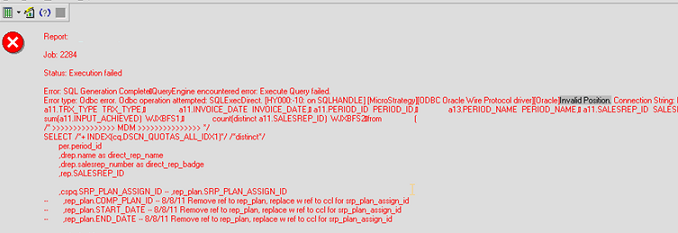
In Strategy Developer 9.x, executing a report against Oracle database runs into following error:
ka02R000000kZx5QAE_0EM440000002C4Q.png


Status: Execution failed
Error: SQL Generation CompletedQueryEngine encountered error: Execute Query failed.
Error type: Odbc error. Odbc operation attempted: SQLExecDirect. Invalid Position. Connection String:
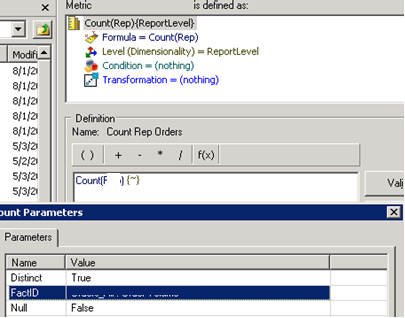
 
The report SQL can be executed successfully in Strategy DB Query tool. The report contains a metric whose Count parameters include a pointer to the fact table as shown below:

ka02R000000kZx5QAE_0EM440000002C4O.png

 
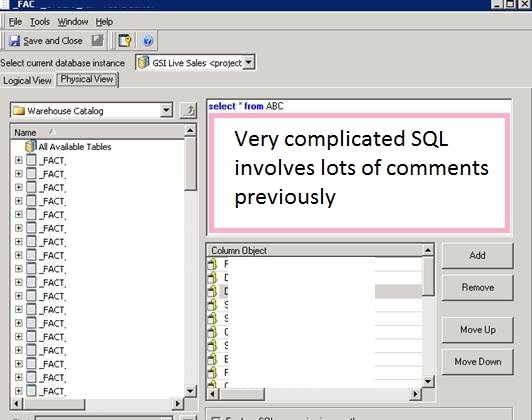
And it is noticed that in the fact table physical view, the SQL window contains very complicated SQL which involves lots of comments as shown below:
ka02R000000kZx5QAE_0EM440000002C4M.jpeg

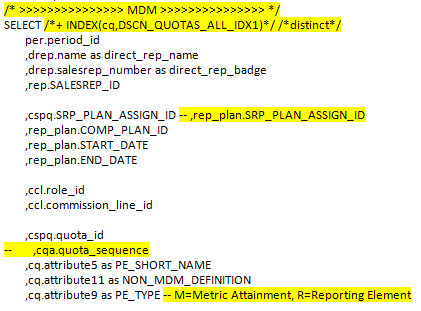
There are two ways to add comments into SQL, one is "/*....comments...*/", the other is "--comment". A snippet of the SQL whose comment has been highlighted is shown below:
ka02R000000kZx5QAE_0EM440000002C4L.png

CAUSE:
One possible cause is that too many comments in the fact table can’t be accepted by Oracle in the same time.
 
ACTION:
Remove the comments from fact table resolves the issue.


Comment

0 comments

Details

Knowledge Article

Published:

June 2, 2017

Last Updated:

June 2, 2017