SYMPTOM:
In Strategy, threshold precision is lost during comparisons to 0 with numeric data type metric values smaller than 10^(-10). For numeric data types, 15 digits of precision can be maintained. But the metric threshold precision stops working past 11 decimal places.
REPRODUCING STEPS IN THE Strategy TUTORIAL PROJECT:
1. Populate the metric value column TOT_UNIT_SALES in the QTR_CATEGORY_SLS table with values smaller than 10^(-10), in this example 0.0000000000014 is used as shown below:

2. Create a report with Quarter as the Attribute and Unit Sold as the metric in the template as shown below:

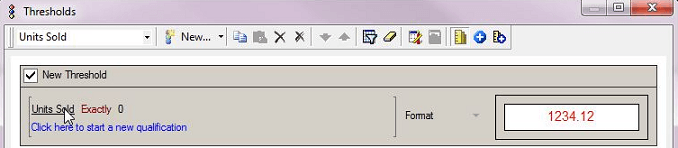
3. Create a threshold comparing the value to 0, set the qualification as ‘Unit Sold Exactly 0’, and the format changed to red as shown below:
4. Execute the report, the value is as shown blow, 0.00000000000000014 but meets the qualification of exactly 0 which is not valid as shown below:

CAUSE:
This is a known issue in Strategy.
ACTION:
Currently this issue is still being reviewed for feasibility by our Technology team and it is not scoped for any upcoming scheduled Strategy release.
WORKAROUND:
Create a derived metric which multiplies the existing metric by a sufficient number to cover the necessary precision. For example an expression of DM1 = metric * 10000000000. When this metric is used in the threshold qualification it should validate correctly.
