EducationSoftwareStrategy.com
StrategyCommunity

Knowledge Base

Product

Community

Knowledge Base

TopicsBrowse ArticlesDeveloper Zone

Product

Download SoftwareProduct DocumentationSecurity Hub

Education

Tutorial VideosSolution GalleryEducation courses

Community

GuidelinesGrandmastersEvents
x_social-icon_white.svglinkedin_social-icon_white.svg
Strategy logoCommunity

© Strategy Inc. All Rights Reserved.

LegalTerms of UsePrivacy Policy
  1. Home
  2. Topics

KB38206: Threshold icon colors for metrics cannot be changed in Visual Insight for MicroStrategy Web 9.4.1.


Community Admin

• Strategy


In the Flash-based Visual Insight Editor (VI), users can set thresholds for the metric values. However, there is an inconsistency between the settings for the threshold band color for values and threshold icons, where the colors switch to default red, yellow, and green values and users are not allowed to change them.

SYMPTOM
In the Flash-based Visual Insight Editor (VI), users can set thresholds for the metric values.  However, there is an inconsistency between the settings for the threshold band color for values and threshold icons.
 
Currently, the band color provides color change functionality that can be accessed by double-clicking on the desired range:
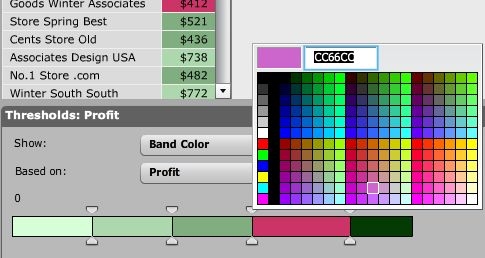
 

ka04W000000OgaeQAC_0EM4400000027QH.jpeg

 
When 'Band Color' is changed instead to an icon, in this case Arrows, the colors switch to default red, yellow, and green values and users are not allowed to change them:
 

ka04W000000OgaeQAC_0EM4400000027QF.jpeg


CAUSE
This is a known issue between the different threshold show types in the Flash VI.
 
ACTION
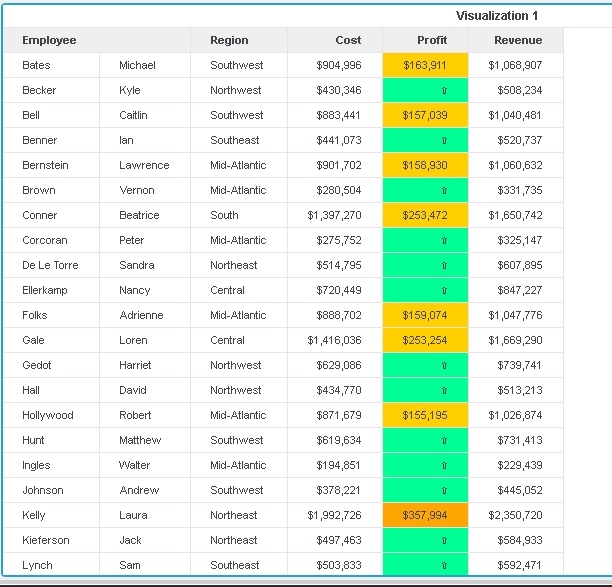
In Strategy 10.x, Flash has been deprecated, but in the HTML5 VI, symbols can be used and the colour change will be preserved. The look is slightly different from Flash:
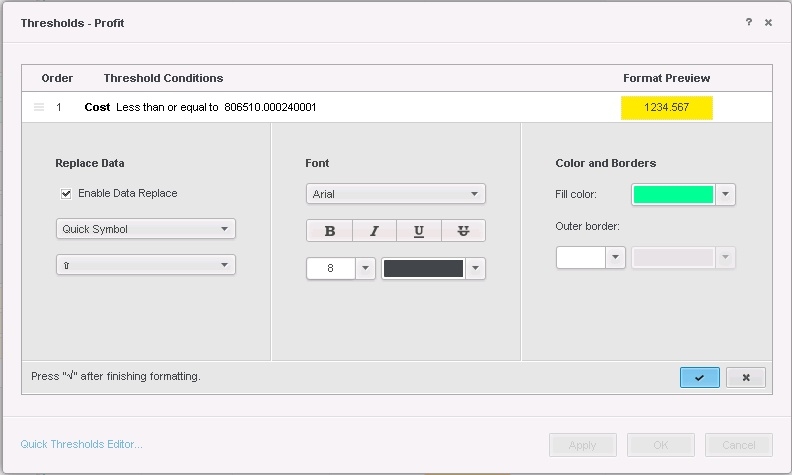
 

ka04W000000OgaeQAC_0EM440000002Pwa.jpeg
ka04W000000OgaeQAC_0EM440000002Pwu.jpeg

Comment

0 comments

Details

Knowledge Article

Published:

June 13, 2017

Last Updated:

June 13, 2017