EducationSoftwareStrategy.com
StrategyCommunity

Knowledge Base

Product

Community

Knowledge Base

TopicsBrowse ArticlesDeveloper Zone

Product

Download SoftwareProduct DocumentationSecurity Hub

Education

Tutorial VideosSolution GalleryEducation courses

Community

GuidelinesGrandmastersEvents
x_social-icon_white.svglinkedin_social-icon_white.svg
Strategy logoCommunity

© Strategy Inc. All Rights Reserved.

LegalTerms of UsePrivacy Policy
  1. Home
  2. Topics

KB38213: "You must complete the qualification before closing. Please enter a value." error message appears even when a value is entered in an attribute qualification prompt in MicroStrategy Developer 9.4.x-10.x


Stefan Zepeda

Salesforce Solutions Architect • Strategy


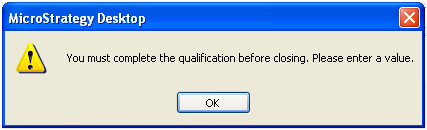
Attribute qualification prompt does not register entries that are added to the 'List' box of a prompt.  'Prompt not answered' message will appear even when prompt answers are selected.   When the operator is set to something else and then back to 'In List' it will accept the entries.

SYMPTOM:
Attribute qualification prompt does not register entries that are added to the 'List' box of a prompt.  'Prompt not answered' message will appear even when prompt answers are selected.   When the operator is set to something else and then back to 'In List' it will accept the entries.
 
STEPS TO REPRODUCE:
Follow the steps below to reproduce this issue in Strategy 9.4.x-10.x
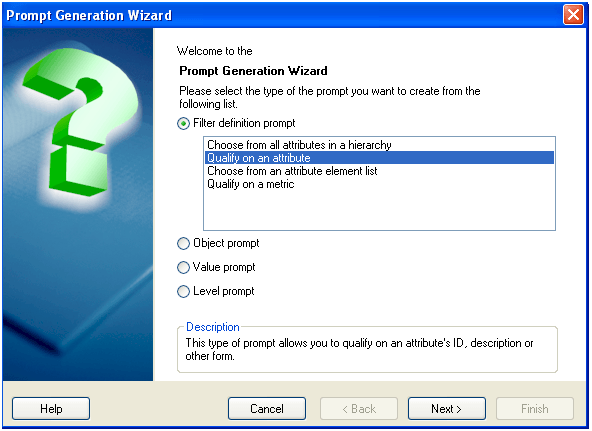
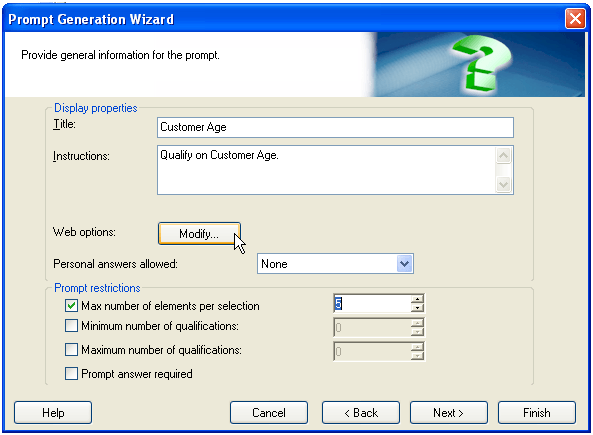
  • Create an attribute qualification prompt based on any attribute.  Customer Age was used in this example.
ka02R000000kcSHQAY_0EM440000002DVL.png
  • In the ‘Provide general information’ window,   click on the "Modify..." button next to "Web Options." As shown in the image below:
ka02R000000kcSHQAY_0EM440000002DVS.png
  • In the Web Options window under Expression Properties, set the Default Qualification Type to "Select" and the Default Operator to "In List." Click OK. 
ka02R000000kcSHQAY_0EM440000002DVN.png
  • Create a report with Customer Age in the rows and the prompt created above in the report filter.
  • Run the report. The prompt should pop up. In the list box type "21." 
ka02R000000kcSHQAY_0EM440000002DVJ.png
  • Click "OK" and the following error will occur: "You must complete this qualification before closing. Please enter a value."
ka02R000000kcSHQAY_0EM440000002DVH.png
  • After clicking "OK" to the error message, select another operator, and change the operator back to "in list," then the prompt will complete successfully.

CAUSE:
This is a known issue in Strategy Developer 9.4.x-10.x.
 
ACTION:
Strategy will continue to investigate and post updates as soon as they are available.
 
WORKAROUND:
Click "OK" to the error message, select another operator, and change the operator back to "In List." The prompt will then complete successfully.


Comment

0 comments

Details

Knowledge Article

Published:

April 19, 2017

Last Updated:

April 19, 2017