EducationSoftwareStrategy.com
StrategyCommunity

Knowledge Base

Product

Community

Knowledge Base

TopicsBrowse ArticlesDeveloper Zone

Product

Download SoftwareProduct DocumentationSecurity Hub

Education

Tutorial VideosSolution GalleryEducation courses

Community

GuidelinesGrandmastersEvents
x_social-icon_white.svglinkedin_social-icon_white.svg
Strategy logoCommunity

© Strategy Inc. All Rights Reserved.

LegalTerms of UsePrivacy Policy
  1. Home
  2. Topics

KB38275: How to encrypt a password in a MicroStrategy Command Manager script


Community Admin

• Strategy


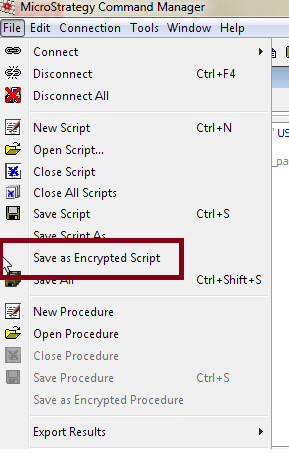
Save the script by selecting “File” > “Save as Encrypted Script.”

This technical note demonstrates how to encrypt a Strategy Command Manager script. If used with provided outlines, there is no encryption of the password.  Encryption of usernames and passwords can be done within Strategy Command Manager to ensure the proper security and is especially useful for batch scripts.
 
Follow the steps below to encrypt a Strategy Command Manager script:
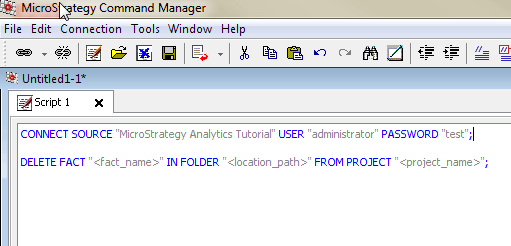
 

  •  Within Strategy Command Manager, create the encrypted script - with the connection parameters and the script to be run. The syntax will be as follows:
    CONNECT SOURCE "project name" USER "user name" PASSWORD "password";
    "The script to be run";
ka04W000000Oh5OQAS_0EM440000002AXk.png
  •  Save this script by selecting “File” > “Save as Encrypted Script.” Follow the prompts. It will require a save location and will ask for an encryption password that will be required to edit the file in the future.
ka04W000000Oh5OQAS_0EM440000002AXp.png
  • When the encrypted script is to be executed, open the Command Line. Within Command Line, the encrypted script will be executed by doing the following:
    "cmdmgr -connlessmstr -f {Encrypted Script File Path} -o {Output File Location Path}"
ka04W000000Oh5OQAS_0EM440000002AXm.png

 Note that the specific syntax will vary based on operating system and the exact functionality desired. More information can be found in the Command Manager Documentation within the System Administration Product Manual.


Comment

0 comments

Details

Knowledge Article

Published:

June 5, 2017

Last Updated:

June 5, 2017