This technical note demonstrates how to create a metric that will enumerate each report row breaking by the desired attribute level:
STEPS TO BE FOLLOWED:
1. Using the Strategy Project Tutorial, create a report with the attributes Category, Subcategory and the metric Revenue. The report should looks like:

2. Create a new metric based on the OLAP function RunningCount:

3. Select the metric Revenue in the ValueList:

4. Insert the attribute Category in the Break-by list:

5. Insert the attribute Category in the Sort list:
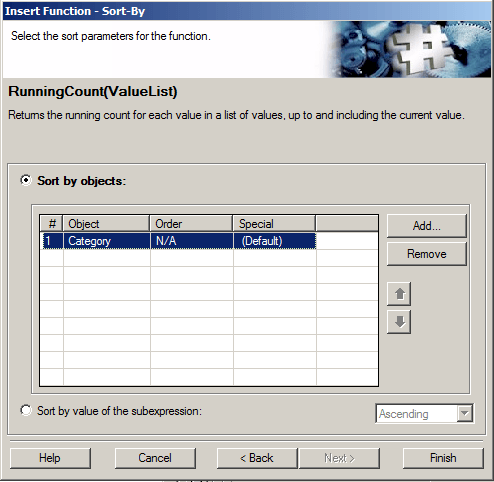
6. Clicking on the button Finish, the metric should be look like:
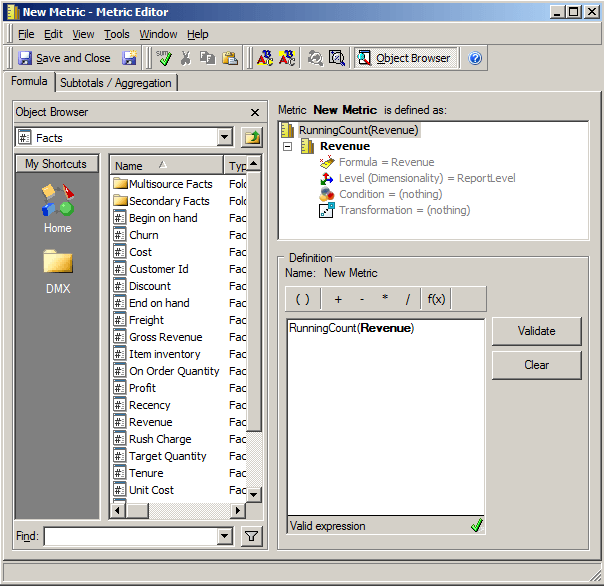
7. Save this metric and add in the report template, so execute the report in order to get the following result:

NOTES:
The usage of the Olap function Rank was disregarded due to the fact that if the metric contains equal values, so the rank values will return repeated values:

REFERENCES:
Refer to the following technical note to know about how to use Rank function:
