EducationSoftwareStrategy.com
StrategyCommunity

Knowledge Base

Product

Community

Knowledge Base

TopicsBrowse ArticlesDeveloper Zone

Product

Download SoftwareProduct DocumentationSecurity Hub

Education

Tutorial VideosSolution GalleryEducation courses

Community

GuidelinesGrandmastersEvents
x_social-icon_white.svglinkedin_social-icon_white.svg
Strategy logoCommunity

© Strategy Inc. All Rights Reserved.

LegalTerms of UsePrivacy Policy
  1. Home
  2. Topics

KB38318: 'Folder not found" error message is seen when there is a backslash at the end of the location path during search in MicroStrategy Developer 9.4.1 and 10.x


Stefan Zepeda

Salesforce Solutions Architect • Strategy


'Folder not found" error message is seen when there is a backslash at the end of the location path during search in MicroStrategy Developer 9.4.1 and 10.x

SYMPTOM
The following error message is received when there is a backslash at the end of the location path during search in Desktop:
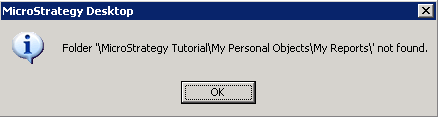
ka02R000000kYd5QAE_0EM440000002DTr.png

 
REPRODUCE STEPS
Follow the steps below to reproduce the issue in Strategy Tutorial project
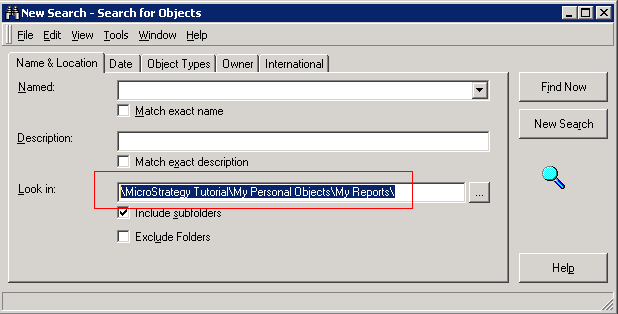
 

  • Create a new search object in Developer.
  • Enter "\Strategy Tutorial\My Personal Objects\My Reports\" in "Look in" field as shown below:
     
ka02R000000kYd5QAE_0EM440000002DTo.png
  • Click on "Find Now" button

CAUSE
This is a known issue in Strategy Developer 9.4.1 and 10.x
 
ACTION
Contact Strategy Technical Support for the latest update of this issue.
 
WORKAROUND
Remove the backslash at the end of the location path.


Comment

0 comments

Details

Knowledge Article

Published:

June 6, 2017

Last Updated:

June 6, 2017