EducationSoftwareStrategy.com
StrategyCommunity

Knowledge Base

Product

Community

Knowledge Base

TopicsBrowse ArticlesDeveloper Zone

Product

Download SoftwareProduct DocumentationSecurity Hub

Education

Tutorial VideosSolution GalleryEducation courses

Community

GuidelinesGrandmastersEvents
x_social-icon_white.svglinkedin_social-icon_white.svg
Strategy logoCommunity

© Strategy Inc. All Rights Reserved.

LegalTerms of UsePrivacy Policy
  1. Home
  2. Topics

KB38349: How to create a filter prompt with start and dynamic end date in MicroStrategy 9.x.


Stefan Zepeda

Salesforce Solutions Architect • Strategy


In certain situations, it might be required to create a report that will prompt the users for a start date and expect the report to retrieve data for the next or previous X number of days. The example blow shows an option to achieve this without using ApplySimple functions
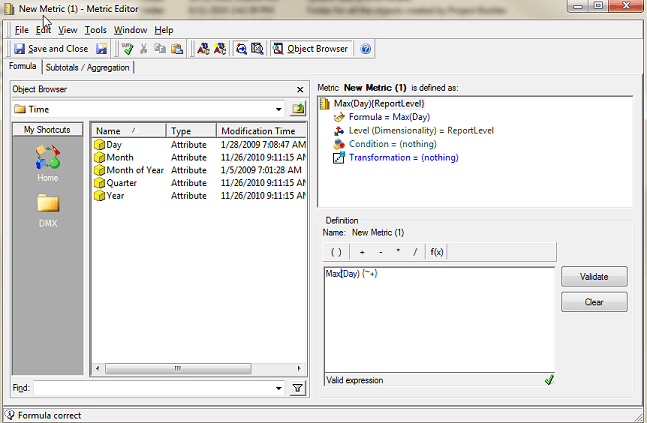
  • Create a metric that is the max(Date) where Date is an attribute. Under Tools, go to Formatting - Values and choose the Date format to be used. Save and close this metric.

ka044000000kUOcAAM_0EM440000002DRj.png
  • Create a report (this report will be used as a filter) and place the Date attribute and the metric just created.
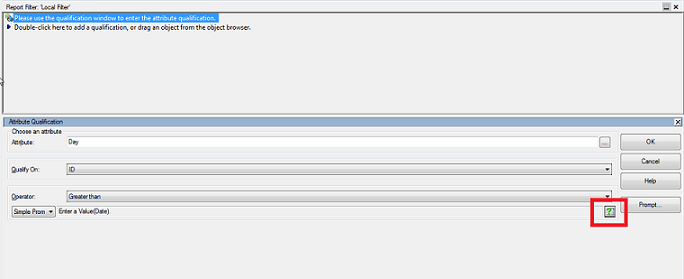
  • Within that report, create a report filter - for the attribute "Date", qualify on ID, operator Greater than or equal to and click on the small button that has a question mark on it next to the text field. Once that opens, hit Finish and click OK for the entire filter.

ka044000000kUOcAAM_0EM440000002DRm.png
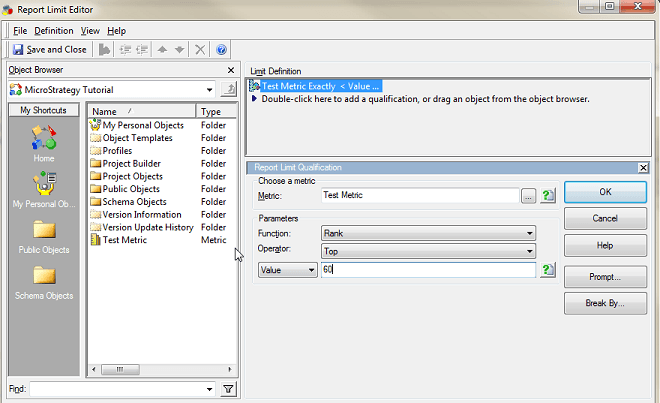
  • Within that report, go to Data - Report Data Options and click on Report Limit.  Click "Modify" and "Double-click here to add a qualification..." Choose the metric you created and under Parameters, Function - Rank, Operator - Top, Value - 60. Save and Close the report limit.

ka044000000kUOcAAM_0EM440000002DRk.png
  • Save and close the report.

Now this report can be used as a filter for other reports, metrics or prompts. The "Value" can be altered for the number of days needed between the start date and the end date.


38349


Comment

0 comments

Details

Knowledge Article

Published:

May 24, 2017

Last Updated:

March 31, 2019